Retain leading zero in CSV
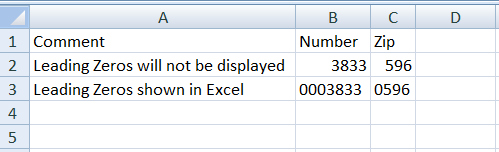
Most web applications at some point will have some sort of an export data feature to get data out of the database in some csv or excel format. CSV is probably the simplest to generate on the fly from PHP and other server side scripting languages. However, I had a particular issue where leading zeros were just not displaying when the csv file was opened with Excel. Look at the example csv below where when opened in Excel will not show leading zeros.
"Comment","Number","Zip"
"Leading Zeros will not be displayed","0003833","0596"
The best solution to work around this is just to add an = in front of the column to avoid Excel from formatting the column when displaying numeric value. So below works fine.
"Comment","Number","Zip"
"Leading Zeros shown in Excel",="0003833",="0596"
Hope this simple trick helps you avoid Excel eating up leading zeros in csv! Any other CSV related suggestions and comments are welcome.
Also to add double quotes are handy in CSV, they can be used to put space and an additional commas within data.
” Company Inc. “, London , UK
” Address, Line 2″, Seattle, WA
Both of the above are 3 column long.
Another way, which doesn’t require extra characters (in case you need to import the data) is to save the csv file as .txt and open it through the “File > Open” element in Excel. This will prompt an import window which will let you specify certain columns as “text” which will retain leading zeros.
Thanks for tip.
I just tried it in openoffice ie without adding = and it works shows without removing leading zeros. It is microsoft excel that removes leading zeros.
Pingback: CSV, ExpandoObject and LINQ « Craig's Eclectic Blog
great!!! helped me alot……thanx
Adding chr(160) to the start of the string works better as there is no “=” symbol to break other applications that don’t read CSV files correctly.
Thanks a lot!!
That’s a great trick – I was running into that problem when working on a csv file of cars to upload to Dupont Registry. The latest issue is that open office is dropping all the commas when I save the file, I have no idea why that started happening since it was working fine before.
Pingback: Web Development articles, tutorials, help » Blog Archive » Retain leading zero in CSV
I can’t see leading zero even after i did exactly what you were mentioned
Thanks!
You are genius. Thanks for the track.