Creating a custom facebook fan page

Posted by iphp on Jan 11, 2010 in Facebook, Javascript Development, Web Development |

A Facebook Page is a public Profile that enables information about business and products to be shared with Facebook users and the public. An user should be able to create one in a few minutes. This article explains how to add custom tabs to your Facebook page to make it do more. Here we explain how we built a carousel, navigation tabs, forms, etc on the Webdigi Facebook fan page.
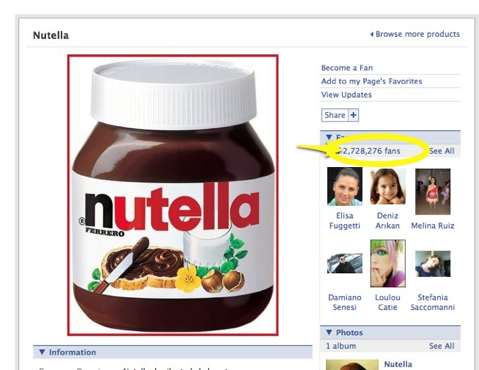
Nutella Facebook fan page

Nutella Facebook fan page

What do you need to create custom Facebook fan pages?

The only thing you need is Static FBML created by Facebook, this is an application that you have to add to your page. You can add advanced functionality to your fan page using the Facebook Static FBML application. This application will add a tab to your Page in which you can render HTML or FBML (Facebook Markup Language) for enhanced Page customisation. You will be able to add more than one tab using this application. On our Facebook fan page, we have three pages created using this application: services, portfolio and contact.

What are the restrictions on Facebook ?

1) Facebook does not allow Javascript to run on load, an user action like a mouse click must be performed before Javascript can be run. You will notice this on the services tab of our Facebook fan page. The carousel mouse over works only after you click on one of the arrows.

2) You will need to use FBJS (Facebook Javascript). This provides the functionality we need to develop custom facebook pages. This is also to protect other users privacy at the same time and restrict Javascript features that can be abused.

3) Use <link href=”http://example.com/style.css” rel=”stylesheet” type=”text/css” /> if you want to use CSS on your Facebook fan page. This is to get the page to work correctly on Internet Explorer. The other browsers support the <style type=”text/css”> tag.

4) AJAX requests have a short timeout and these requests are proxied via Facebook. There are also limits on length of JSON replies, etc.

Creating tabs on the Facebook fan page using FBML and FBJS

FBJS is Facebook’s solution for developers who want to use JavaScript in their Facebook applications. FBJS DOM objects implement most of the same methods regular JavaScript objects implement including: appendChild, insertBefore, removeChild, and cloneNode. Properties like parentNode, nextSibling, src, href (and many many others) have been redefined as a couplet of getters and setters (getStyle : setStyle, getValue : setValue, getClassName : setClassName). Here is an example of a tab on a Facebook page.

apptabs

Creating a carousel on the fan page

FBJS exposes a powerful animation library which gives developers an easy way to improve their user interface with a line of code or two. All animations are CSS based, so a working knowledge of CSS will really help you out here. One of Facebook’s security restrictions are that Javascript will not be allowed onload of the page. The user must perform an action like clicking on a button, etc to begin Javascript code execution. This would mean that automated carousels; a carousel that starts rolling images by itself cannot be built into a Facebook fan page. This restriction also applies to pages with video, etc.

portfolio

Submitting a web form using AJAX

Creating a form for a fan page can be done using HTML. The AJAX support from facebook is interesting. All AJAX requests to the server you have under your control goes through facebook. If you have a tool monitoring the AJAX request, you will see that the form is actually being sent through to fbjs_ajax_proxy.php which in turn POST or GET the request to your server. The AJAX request can be sent using FBML in 3 steps:

var ajax = new Ajax();
ajax.responseType = Ajax.FBML;
ajax.post('http://example.com/ajax.php');

Creating Dialog boxes on Facebook
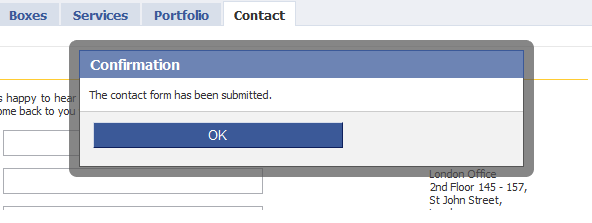
dialog

FBJS offers a variety of Dialog boxes: Confirmation boxes, Yes/No type, Dialog boxes with forms, Choice, etc. To create the above dialog, we just need the following one line of code

new Dialog().showMessage('Confirmation', 'The contact form has been submitted.');

Show me the code

Here are all the three code files that are in use for each of the three tabs on Facebook.

Contact Us tab (Containing form, AJAX submit and Dialog boxes) code

Portfolio tab (Carousel using FBJS Animation features) code

Services tab (Tabs within page, basic FBJS events) code

We hope this helps you cut short your search and gives you a head start in your quest to build custom tabs within Facebook pages. There are numerous resources out there that helped us understand FBJS and build this article. Do send us links to fan pages that you have built, looking forward to your comments.

Tags: , ,

175 Comments

Glad
Jan 13, 2010 at 11:13 am

Thanks for sharing the code and giving me a head start. I found a way to use AJAX bypassing Facebook central server (using FBJS LocalProxy) and hope it helps people who want to speed up requests.

AJAX allows you to make three different types of requests. RAW, JSON, and FBML. For FBML, it is necessary that the request go through Facebook FBML proxy server so that Facebook can collect data and render the FBML. For RAW and JSON types, there is no reason to go through the Facebook central server. The Ajax object now has a new property useLocalProxy that lets you make direct calls to your app server. If you find yourself using Ajax often it is worth checking out this new functionality.

This requires this file being placed in crossdomain.xml on your server, changes to FBML and using ajax.useLocalProxy=true. For more information google FBJS LocalProxy.


Matthew FOrr
Jan 13, 2010 at 9:07 pm

Most excellent! I’ve really enjoyed building a Facebook fanpage for my employer and have been procrastinating putting a Email newsletter signup on it. I finally got around to it today with inspiration from you guys.

One note, the CSS that you guys use in your contact form is pretty broken in FF 3.5.2, apparently FB adds a lot of hidden input fields to any form element. I found that to fix this you need to create a class for you input, textarea, labels and etc. Hope that helps!


Henrik Persson
Jan 14, 2010 at 12:31 am

very interesting, i’ve been a “fan” of nutella on fb for about a year or so, and never actually looked at their page.


Destiny Islands
Jan 14, 2010 at 3:15 am

Really useful guide dude! So many people don’t know how to utilize Facebook, but reading your article and learning from your advice really helps. Thanks again!


How to Create a Cutsom Facebook Page with FBJS
Jan 15, 2010 at 10:37 am

[...] users and the public. An user should be able to create one in a few minutes. This article “Creating a Custom Facebook Page” explains how to add custom tabs to your Facebook page to make it do more. He has explained how [...]


Jasper
Jan 15, 2010 at 11:51 am

Very interesting, thank you!


Webling
Jan 15, 2010 at 6:54 pm

Comes handy at the right time. Thank you!


Danny
Jan 15, 2010 at 9:50 pm

Very useful guide. Thank you.

Can you call the Facebook API from a page? For example, can you provide a button that will update the user’s status when clicked (“is the biggest fan of [product]“).


How to create custom facebook fan page | blogfreakz.com
Jan 16, 2010 at 4:56 am

[...] this tutorial we will need Static FBML created by Facebook, this is an application that you have to add to your [...]


» Creating a custom facebook page – PHP, Web and IT stuff :: La Gaceta del Norte
Jan 16, 2010 at 4:34 pm

[...] Visitar enlace [...]


What Do You Need to Create Custom Facebook Fan Pages? Webmove
Jan 18, 2010 at 2:30 pm

[...] Link: webdigi.co.uk [...]


GrZeCh
Jan 20, 2010 at 4:03 pm

Does someone faced issue that document.getElementById(‘name’) returns null?


Kalesaray
Jan 23, 2010 at 3:26 pm

very nice,Thank you.


Loraine
Jan 23, 2010 at 3:27 pm

Great works well.


Brett Skinner
Jan 24, 2010 at 2:39 am

Very nice, thank you for sharing.

Just managed to get my facebook contact page working with AJAX.


Omares
Jan 24, 2010 at 11:51 pm

Muchas gracias or Thanks a lot!!!!!!!!!! :D


Mansur
Jan 28, 2010 at 9:45 pm

Thanks!! Helped a lot. Great Post guys!!!


gf
Jan 30, 2010 at 1:13 am

Hi, could you maybe add the code from the contactus.php ? or just a simple code that sends email from this.. I copyed your codes and tested the thing and all the facebook stuff works great and easy to edit and modify, but i´m really stuck at what the contact.php should look like, i just found some very basic contact.php on about.com or something and that file is getting me no emails from the form and also it always gives me error messages on facebook :)

But great and very helpfull tutorial :)


iLibrarian » Creating a Custom Facebook Fan Page
Feb 1, 2010 at 4:27 pm

[...] folks at Webdigi have posted a tutorial for Creating a Custom Facebook Fan Page on their PHP, Web and IT stuff blog. This detailed guide provides step-by-step instructions and [...]


Webdigi Blogger - iphp
Feb 3, 2010 at 5:52 pm

Thanks for the wonderful feedback and to all the fans on our Facebook fan page!

@gf, you are on the right track, you will be able to get all the details in the $_POST super global
$_POST['name']
$_POST['email']
$_POST['telephone']
$_POST['message']. Do send us a link to your facebook fan page.


Really Useful Tutorials You Should Have Read in January 2010 Ajax Help W3C Tag
Feb 11, 2010 at 8:33 am

[...] Creating a Custom Facebook Fan Page January 11th, 2010 Site: PHP Web and IT Stuff [...]


felipe saavedra
Feb 11, 2010 at 2:13 pm

muchas gracias, comenzaré a usarlo pronto.

saludos,
Felipe


Alusión (weekly) « Alusión…Llamada Virtual
Feb 14, 2010 at 12:37 am

[...] » Creating a custom facebook fan page – PHP, Web and IT stuff [...]


AJ
Feb 16, 2010 at 9:25 pm

Are you able to stack the javascript portfolio somehow and make them click independently?


Julián Landerreche
Feb 19, 2010 at 3:19 pm

Thank you for this great tutorial and for sharing the .fbml examples. They were really helpful to understand the basics of Static FBML.

I’ve already created a few custom tabs for a company’s FB Page, including a contact form processed by Swiftmailer library.
I used 520px as width (it has been announced that FB Page canvas width will change to that width, eventually, right?).

Thanks again!


soledad
Feb 21, 2010 at 6:00 pm

Hello! Great stuff guys! It’s really usefull!

I’m having a problem with ajax.onerror function. If i don’t fill the fields, the “Sending ok” appears, and not the error message. I’m not sure if i need some particular variable in my php… can you help me please?

Thank you so much in advance!!!


PHP, Web and IT stuff » Blog Archive » Google Analytics for Facebook Fan Pages
Feb 22, 2010 at 5:25 pm

[...] If you don’t have a Facebook fan page yet, visit our tutorial for code and help on creating customised Facebook fan pages. [...]


Usare Google Analytics con le Fan Pages di Facebook | maxzaglio.com
Feb 22, 2010 at 10:15 pm

[...] If you don’t have a Facebook fan page yet, visit our tutorial for code and help on creating customised Facebook fan pages. [...]


Fran
Feb 24, 2010 at 12:42 pm

Hi there

It’s brilliant table – but I’ve got two questions – they might seem a little daft. Where do the email requests actually go to? And is there any way of clearing the table after the form has been sent?

Many thanks
Fran


California Wedding Photographer
Mar 1, 2010 at 2:06 am

Thank you so much for sharing your FBJS animation code. I was able to modify it to create a very simple, but striking way to improve my photography fan page. You can see it here:

facebook.com/embracelifephoto

I appreciate your openness!


Rob Q
Mar 2, 2010 at 10:13 pm

I took your “portfolio” FBML code and dropped it in a fan page static FBML tab with the idea of testing, It worked!

I’d like to second GF’s request for a copy of the script contactus.php for processing the emails – would that be possible? Awesome tutorial all around.


iphp
Mar 3, 2010 at 7:55 am

@gf, @Rob, Thanks for your comments, I am glad it helped.
Here is a PHP script that you can use on the server for contactus. Please make changes as necessary. Here is the link: pastebin.com/raw.php?i=0AE4khs2


JQueryin » Archive » » Overriding Facebook FBML Styling on a Canvas Page
Mar 4, 2010 at 11:18 pm

[...] and would still like to utilize a canvas page, I highly suggest you read the article entitled Creating a Custom Facebook Page as it guides you through all the steps necessary to getting a FBML page up and running with minimal [...]


How to Pimp Your Facebook Fan Page » CapeLinks Blog
Mar 8, 2010 at 12:38 am

[...] Creating a custom facebook fan page Extending Facebook Static FBML Tabs with Dynamic Content [...]


gill
Mar 8, 2010 at 12:45 am

Awesome guyz, jst wana thank u


Dave W.
Mar 9, 2010 at 1:05 am

I am having the same issue as GrZeCh above, where my elements that are referenced by document.getElementById are returned as null to my processing script. Everything is working fine when I a default value is submitted in the contact form, but any user input doesn’t get passed through.

Any help would be appreciated.


Julián Landerreche
Mar 9, 2010 at 1:27 pm

I’ve also added a contact form on a box, next to the Wall. :)
The only limitation here seems to be that you can’t link to a CSS file, so you have to include the style rules inside a tag.

You can check it here:
facebook.com/cluster.efectos?v=wall


saika
Mar 13, 2010 at 9:31 am

hey guys, is it possible to create facebook fan pages from PHP? I wanna create fan pages for my portal users using PHP code.

Thanks in advance guys.


Jani
Mar 17, 2010 at 1:00 pm

Thanks for the great example. I’m trying to get the contact form to work at developers.facebook.com/tools.php?fbml I just copied your script and changed the form address to mine, but I keep on getting ‘An error has occurred while trying to submit.’ Any ideas why?


js
Mar 25, 2010 at 10:06 pm

I second Fran’s comment. Is there a way to clear the form after someone clicks on the “Okay”? OR second, is there a way a user can be redirected to another page after clicking on the Okay button?

Thanks in advance!


iphp
Mar 26, 2010 at 1:43 pm

@js,@fran Clearing down the form is pretty easy to do for someone who understands Javascript. I am hoping someone who found this article useful will contribute. In the Javascript function submitAJAXForm() we need a document.getElementById(‘name’).setValue(”). This should be repeated for each of the fields. An easier method might be to use form.reset() if Facebook allows it!


Rachel
Mar 31, 2010 at 4:48 am

Hi! Thanks for the article. Would you mind giving me some further assistance (or tips). I followed your instructions and the form seems to function, but I never receive the email.
This is the link/page I am working on: (http://www.facebook.com/pages/Allen-TX/Home-Maintenance-Solutions-HMSRepair/105934849398?v=app_7146470109)
(once I get it working I want it to be my default landing)
And here is a link to my PHP script: (http://pastebin.com/KaYwxh77)
I am new to php and I cannot figure out where or what is my error.


Angela
Apr 1, 2010 at 12:10 am

Thanks so much for posting this! I was struggling with another form, then found this… and it’s great. Would be nice to know how to clear it after submit, but I’m content with it as is. Thanks again!


Tracy A. Wehringer
Apr 3, 2010 at 1:07 pm

question – I loved your code to create a form on FB, but what do I need to do to have the inbound emails come to me?

Thanks, love your site
Tracy


Jani
Apr 6, 2010 at 4:08 pm

Posting this again since it says awaiting for moderation…
Thanks for the great example. I’m trying to get the contact form to work at developers.facebook.com/tools.php?fbml I just copied your script and changed the form address to mine, but I keep on getting ‘An error has occurred while trying to submit.’ Any ideas why?


Omer Rosenbaum
Apr 11, 2010 at 10:20 pm

Hi!
I tried the contact form but it deoesn’t work. After filling my details and sending I get a massage that it was sent but receive no email.
Should I change something in the contact form script? I just copied and pasted it in the FBML tab. Do I need to upload a file to my server that will do the action of sending?


iphp
Apr 12, 2010 at 9:17 pm

@Omer, @Rachel, You will need to have some PHP code running on your own server to send the data in an email submitted via the Facebook. This is a fairly trivial thing to setup for a PHP/web developer. You can try with the code posted on this page: pastebin.com/raw.php?i=0AE4khs2


Clint
Apr 15, 2010 at 1:39 am

It looks great but I have the same question as Omer, what part of the code do I change so it comes to me?

Thanks!


Cullen Swanson
Apr 23, 2010 at 6:14 pm

This is awesome, thanks for sharing! I will implement into all of our client’s websites now lol


Paul
Apr 27, 2010 at 7:03 pm

Hi there… a quick question.

I followed your example, and it’s stunning. Really helped me a lot.

Now a question. Is it possible to put in a few radio buttons?

In my contact form, I need to ask for their age range, and I thought either a drop menu, or radio buttons would be easiest… but I can’t find any ANYWHERE.

Please, if you have some little piece of magical code, you would help me so much…. have spent 48 hours googling to no avail.

Thanks


Paul
Apr 29, 2010 at 1:58 pm

Hi there.

What happened? My FBML page just dissapeared, or at least it seems to try and load then nothing else happens. I panicked, and thought I would go check your out… YOUR’S DOESN’T WORK EITHER!

Go and try to see your portfolio tag… it endlessly loads.

What happened?


iphp
Apr 30, 2010 at 11:20 am

@Paul, Thanks for alerting us. This is now working. This was caused by Facebook making some changes. You can read more about it here bugs.developers.facebook.com/show_bug.cgi?id=9968 This was reported by another person on our Facebook fan page http://facebook.com/webdigi.


Building a Stellar Facebook Page to Attract Your Raving Fans and Customers | jirrajarra - Web 2.0 Technology Made Simple
Apr 30, 2010 at 12:52 pm

[...] that provide the eye candy to draw people in. Webdigi, a web design company in London, has some great advice and tips for how to spice up your Fan Page so it rises above the [...]


Creating A Custom Facebook Fan Page - ChurchKreatives – A Community For Creative Christ Followers
May 4, 2010 at 3:03 pm

[...] can integrate CSS, JavaScript, or Javascript if you’d like. You’ll need to check this page for more advanced [...]


Ben
May 4, 2010 at 11:09 pm

Hi im a small online company and i need the 1,2,3 hack steps to making a custom page for FB. I would also like to know where i even input the code on facebook to begin with….Can you point me in the right direction??


Lucas H
May 11, 2010 at 3:19 pm

Thank you so much for the contact form codes.

Me and my friends are running a small online store, and it seems like the codes came in time for us….Great stuff~


Tim
May 13, 2010 at 9:40 am

Thanks for the article! We have built a custom facebook page for our marketplace too – facebook.com/FlashScope :) Check it out!


Okg
May 13, 2010 at 10:58 am

How do I enter my e mail address? The form was submitted to the fan page but the messages don’t appear on my e mail.

Thanks for this great post:)


Amish
May 14, 2010 at 7:12 am

I am not Tech savvy and i dont know how to use AJAX or JAVAscript, is any other facebook application available which helps me to create my fan page ?


adam
May 17, 2010 at 9:27 pm

so how do you get the contact form to send to your own email?
thank you


Vince
May 18, 2010 at 7:03 pm

Great info here, anyone available to help with the php to send in the form?


Popiplo
May 23, 2010 at 3:29 pm

Thanks for sharing the code, it is very useful. Great work!


Suske
May 25, 2010 at 4:13 pm

Good stuff. I do seem to get the email 3 times though. Is that just me?


Suske
May 25, 2010 at 9:31 pm

ah.. it’s a facebook thing, if you have your post destination URL return blank content then FB hits the page 3 times.

However, if you have your page return with some sort of content it will only hit it once.

I just added
echo “dummy value”;
to my PHP


Dave Reeder
May 26, 2010 at 10:08 am

Very nice tutorial thanks, very useful, I shall produce my own facebook page when I launch my new site later in the year :)


Alexey
May 30, 2010 at 9:27 am

Nice tutorial. Anyway I need to call Iframe on my FB page without clicking on a link.
How can I do this? Maybe with onLoad event?


Amit
May 31, 2010 at 6:20 am

I used the code and also created the PHP page on my server to collect the data which is working fine.. But major issue i have is with submitting the form.. When i submit the form, always the Onerror function is called whereas the data gets submitted 3 times.. What is the response data to be sent back fromt he server? Can u pls help me..


matthew
Jun 10, 2010 at 4:54 am

where would I put the echo? I put it in the php and it doesnt ever send the email to me. Once I take away the echo, it allows the email to go through, but it sends three messages.

Can anyone help with implimenting the reseting of the form?


iphp
Jun 10, 2010 at 7:08 am

@Suske, thanks for posting your find. We use a separate script to send out email and it works fine.

@matthew, I have updated the code here http://pastebin.com/raw.php?i=U3WGZNBY

@Alexey, Unfortunately, Facebook does not give us an onload event. I think they dont want Facebook to be as messy as MySpace with onload music, etc.


matthew
Jun 10, 2010 at 4:27 pm

ok thanks that helps a lot. I was just putting the echo in the wrong place by mistake. PHP isnt my strong side. Neither is Java Script. Did anyone figure out how to reset the form?


Susan
Jun 12, 2010 at 2:38 pm

Thanks for the informative post. Great ideas, and a good starting point.


mas joe
Jun 14, 2010 at 9:12 am

Thanks For tutorial this very Great Ideas


Shana
Jun 28, 2010 at 8:26 pm

Hi there – thanks for this. I’m not a programmer either. lol I do understand though that the code needs to be altered to my own function… but… can someone point out which lines of code have to be changed? I DO have a PHP form on my own website already, but I’m not sure of how to link that to this code. (& i’ve tried just using MY form on my fb page, which it did show up, but it wouldn’t send.)

TIA for your help if at all possible!


Tim
Jul 2, 2010 at 2:53 am

How do you get the rolling, animated tag cloud???? Very cool!!


keith
Jul 6, 2010 at 4:01 pm

Some good information there has helped a little bit, but how do you get things to show down the side of the page and not just a tab to another page ?


Designing A Facebook Fan Page: Showcases, Tutorials, Resources - Smashing Magazine
Jul 7, 2010 at 11:34 am

[...] [...]


Designing A Facebook Fan Page: Showcases, Tutorials, Resources | 
Jul 7, 2010 at 12:05 pm

[...] Creating a Custom Facebook Page This useful guide gives you a head start on building your own fan page on Facebook. The tutorial includes such basics as Facebook page creation, restrictions on Facebook, creating tabs and displaying navigation and content elements using FBML and FBJS. [...]


Designing A Facebook Fan Page: Showcases, Tutorials, Resources | Web Design Cool
Jul 7, 2010 at 1:12 pm

[...] Creating a Custom Facebook Page This useful guide gives you a head start on building your own fan page on Facebook. The tutorial includes such basics as Facebook page creation, restrictions on Facebook, creating tabs and displaying navigation and content elements using FBML and FBJS. [...]


Ilie Ciorba
Jul 7, 2010 at 3:41 pm

Awesome post! After viewing a showcase of custom f, fan pages I decided to make my own!


Designing A Facebook Fan Page: Showcases, Tutorials, Resources | i know idea
Jul 7, 2010 at 3:41 pm

[...] Creating a Custom Facebook Page This useful guide gives you a head start on building your own fan page on Facebook. The tutorial includes such basics as Facebook page creation, restrictions on Facebook, creating tabs and displaying navigation and content elements using FBML and FBJS. [...]


Bacca
Jul 10, 2010 at 5:30 am

Thanks for this article! I had to mess with the FBML alittle bit but I got it working pretty well.


Orlin
Jul 13, 2010 at 11:20 pm

Thank you for the intro!


Jake Summers
Jul 16, 2010 at 1:05 am

Can you point me in any simple direction on how to make the form fields required?

Your code worked perfectly! I just want to make some fields required because right now they can just submit blank forms.


An Hoang
Jul 17, 2010 at 6:36 am

Hi … I want to redirect url facebook page to another using FBML ?? help me, thank you


Sakura Martinez
Jul 23, 2010 at 5:41 am

Thanks for the useful tutorial and codes. I would like to ask however, as I have yet to test these codes, if the code found on the top of the page (in the main post and not on the comments) are updated codes?


Ryan Bollenbach
Jul 31, 2010 at 3:25 am

It’s so awesome to see this evolution and I’m really excited for the future of it!! :D .


Mike
Aug 4, 2010 at 8:26 pm

Ok sorry got it working.

Form validation with your code would be really nice!!! :-)


Suresh Sharma
Aug 7, 2010 at 9:33 am

Hi Dear,

Thats very helpfully for me. Because my senior never give right way for this. They always hide.
Thank for your post.


Joe
Aug 13, 2010 at 4:35 pm

I am using iphp’s php code , seems like everything works but I receive no email..

I made the necessary changes to the php file as far as my email address.

I changed the location of the php file in the fbml code to where I have my php file hosted.. There seems to be two places to do this.. one at the top and one at the bottom…

When I made the change at the top it acted like everything went through but never received any mail ,

Changing the bottom part made the form not work


Mark
Aug 16, 2010 at 2:07 am

Very helpful information, thank you so much – I mostly use FBML and RSS/notes to get a new page up and running pretty fast – along with Photoshop and CSS for a nice image map you can get a lot of good content that’s appealing … it’s great to find information like this to help –
Here’s my latest page: facebook.com/pages/ReXark-Archival-Recordings/152834168063347


Chips
Aug 16, 2010 at 4:01 pm

Thank you for all your share! I am a new guy in Facebook App. I wanna to check the user is “LIKE” before send the mail, is it possible?

Do i need to add some checking in ajax or javascript?

Thanks for your help.


Lindsay
Aug 23, 2010 at 4:46 am

First I wanna say, thanks for sharing your knowledge.. You have, so far, had the most knowledge in one post I have come across regarding FBML – people don’t seem to wanna share too often .

SO I am currently having an issue with using this – i dont know if it’s because facebook has changed since you posted this..

I have this page here:
facebook.com/pages/Hug-Me-Up/145464638811742?v=app_4949752878

And I just copied and pasted your code and was going to customize after I got the form to submit. I have taken your php code from pastebin and added my own email address..

I have copied and pasted your html and ajax code into the fbml box and changed the action to use my form_submit.php page.. I have the form action and the ajax post set to that form…

When I try to submit the form, I get an error that says it could not be submitted. There are no errors that I can see in firebug and everything seems valid. I am at a loss!!!!

I would REALLY appreciate help
facebook.com/pages/Hug-Me-Up/145464638811742?v=app_4949752878


gx
Aug 25, 2010 at 1:12 pm

3q very much!


Lemon
Sep 2, 2010 at 11:30 pm

Thank you for your tutorials! Great stuff!
but…
I cannot get the contact form to work.
I’ve double and triple checked everything i know.

Using my edited version of your contact.php form and utilizing your code, when the ‘send message’ btn is clicked it just says ‘sending’ and nothing happens…

FB page is here: facebook.com/pages/Seattle-WA/Grad-Nights/177421153362

any help? anyone else having this problem?
Thanks!


Smashing Magazine: Designing A Facebook Fan Page: Showcases, Tutorials, Resources « Facebook applications for developers
Sep 3, 2010 at 3:32 pm

[...] Creating a Custom Facebook Page This useful guide gives you a head start on building your own fan page on Facebook. The tutorial includes such basics as Facebook page creation, restrictions on Facebook, creating tabs and displaying navigation and content elements using FBML and FBJS. [...]


Alan
Sep 5, 2010 at 11:40 am

Hi,
Thanks for tut almost up and running now but I have a problem where my logo.jpg wont load I just get a white back ground heres my code:

#logo
{ background: #FFF url(site_logo.jpg) no-repeat;
color: #67705A;
}

any ideas?


Static FBML Contact Form with Validation for Facebook FanPage | System.Errors + brickbats
Sep 8, 2010 at 10:48 pm

[...] Credit: Webdigi [...]


Dommy
Sep 11, 2010 at 12:03 am

yep looks like none of the ajax is working on facebook, form validation fails, and external stylesheets will not load.. any news/updates on this ?


Kym
Sep 15, 2010 at 8:32 am

Thanks for the info – but I’m still having trouble. Don’t suppose anyone who’s got this figured out would be kind enough to help me out?

my facebook page is here: facebook.com/gorgeousporgeous and I’d be happy to make someone admin for a short time while they set it up for me :o )


ikelleigh
Sep 16, 2010 at 7:17 pm

Hello there. Just stumbled on this because I was recently researching creating a contact mail form on a Facebook Fan page. I don’t know if you still support this page, but was wondering how to accomplish this with ASP rather than PHP? The Ajax seems to be looking for some kind of response, but I’m not sure how to give it that response in the ASP code.

Thanks.


Keith
Sep 21, 2010 at 2:50 pm

I am having the same problem as @Lemon and a few other people, i fill out the box, press send message, pops out a box that says ok, close go back to main main and it says sending but I never get the message?


Mike
Oct 4, 2010 at 5:05 am

It sounds like a good deal…


Todor
Oct 8, 2010 at 10:08 am

Hello guys,
great work… thank you very much!

But, is there any way to modify the code, so I can receive a proper Cyrillic letters… otherwise with Latin there is no problem.

Really appreciate your answer!


Rehan Ahmed
Oct 16, 2010 at 11:35 pm

Very nice work.

I have one question, instead of sending email if I submit data in database and then do some calculations. After that, Is that possible If I fetch some data from database and show on given tab? If Yes, then how?

Thanks in advance.

Regards,
Rehan


iphp
Oct 17, 2010 at 5:48 pm

@Rehan, Yes, you should be able to load data via AJAX and load them on the page. This is similar to the normal approach of displaying AJAX data on websites.

@Lemon, Have you changed the URL on the page to post your form data? Did you upload a PHP file to receive your POST data?

@Lindsay, Facebook did change a lot of things since we posted this article. Things do work largely without major problems.

Can I please request the readers of this blog to kindly help out other people if they can? This will be an ideal way to contribute if this article has helped you!


Chauhan Ashu
Oct 21, 2010 at 12:38 pm

I am sending the thanx to the webdigi team for this help.

Thanx!


joe
Oct 22, 2010 at 11:40 am

Disregard last message! Figured it out… Great stuff!


Evan Johnson
Oct 22, 2010 at 3:51 pm

Hello everyone! I would like to plug splashtab.com for anyone looking to create a custom Facebook Page, but who doesn’t have the time or knowledge to fuss around learning FBML. It’s a service I’m working on to make creating custom Tabs as easy as writing an email. Check it out – we have a free trial! Cheers-


T.rex
Oct 22, 2010 at 9:40 pm

Hi iphp,

I think i’m really close to getting this… I have the FBML code pointing towards my php page located on a server, however, they are not quite communicating.

the FBML code says:

Name

on the PHP page, there is a line:
$email = “Orgin of request : “.$_POST['orgin'].”";

What is this “ContactForm”? What should i type there to make it point towards the php code you provided (version 2).

I really appreciate it!


T.rex
Oct 22, 2010 at 9:46 pm

oop… my above post didn’t paste the FBML code. Basically, how do i change the code provides on this page, to correspond to the PHP example (version 2) that you provided? I understand about the actual PHP link, but i don’t know what ContactForm is… Its not references on your PHP example. Thanks!


Nicola
Oct 26, 2010 at 4:17 pm

Great article, thank you! However, I don’t seem to be able to add the static FBML to my page (when the ‘Select which Page you wish to add Static FBML to’ box pops-up it says there are no results, even though I have got 5 pages under my account! Any suggestions?

Thanks in advance!


Anibute
Nov 1, 2010 at 8:04 am

I tried many scripts. But nothing worked quite as good as this.


Brian
Nov 4, 2010 at 3:49 pm

Wow! I am forever in your debt!! I spent the past two weeks trying to get FBJS and Ajax in particular working and having a terrible time. Within an hour of finding this page, I had my ajax up and running.

A few quick notes: My PHP is generating a string containing HTML and I echo this out at the end of the script. My response type was Ajax.FBML and I take this in ondone callback as data variable. I then put it into a div like this: document.getElementById(‘div-id’).setInnerFBML(data);
and this worked, though not at first. I made an unknown change and then it worked. Isn’t that always the way?

But thank you tons!! This should become the official FBJS page in all honesty as ALL of the examples are more accurate than the actual documentation.


iphp
Nov 4, 2010 at 4:08 pm

@Chauhan @joe @Anibute @Brian
Thanks for your positive comments and encouragement. We learn a lot from various blogs out there. The least we can do is to share what we learn.

@Brian, thanks for sharing details. I hope it helps someone trying to make this work.


Sofie
Nov 11, 2010 at 4:24 pm

hi guys, i was told, a number of times, that FB is going to remove their Tabs soon, however, it’s their Profile Tabs they are removing, correct, NOT their Page Tabs, right? THerefore, we can still create FBML custom Tabs, right?
THANKS! I’m just getting mixed messages!
Sof


Puzbie
Nov 12, 2010 at 9:19 pm

Sofie, from what I have learnt over the last week or so of Facebook App learning, if you have a fan page, you will still be able to have an application tab. FBML seems to be on the way out, unless its on a static FBML fan page.

You can also use a PHP app instead of a static FBML page, giving you greater control, if you know PHP. I am documenting my findings on my blog; facebookanswers.co.uk/?p=106
You may find it useful. It is however, a work in progress.


Ravi Joshi
Nov 13, 2010 at 6:06 am

Gr8 work


JohnK
Nov 15, 2010 at 8:41 pm

Thanks for the info. I have used this on our FB page and works great.


Susy
Nov 16, 2010 at 12:17 am

Excellent!!
Thank you! Thank you! Thank you!!


Val
Nov 18, 2010 at 8:17 pm

The image carousel is great.

I am having one issue. I added extra slides to the carousel, but when I over over my new ones in backwards order (right to left) the text stacks on top of itself rather than replacing what was there before. This only happens to the new slides I created, not the original ones in the example.

I am a noob at javascript, so any help is appreciated.


Teresa
Nov 19, 2010 at 7:40 pm

I am using the sample php email script that you’ve supplied, which is working great.

One Question: How do I get the email address that the user submitted to go into the From email address so that we can simply hit reply to the email that is sent to us which would allow us to easily send an email to the form submitter?


Stefano
Nov 25, 2010 at 8:54 am

fantastic script and works like a charm – I used your php script (pastebin.com/raw.php?i=0AE4khs2) on my server to make it work… just a small issue – After clicking “thanks” on the confirmation the box goes away but the form does not reset to a blank state – it just shows all the inputs still filled and the button still says ..sending.. – I receive the email no problem, but is there something to do to reset the form after sending? Let me know, thanks :)


Jim
Nov 28, 2010 at 9:31 pm

Nice work. I finally got the email to work but have 2 issue that I’m hoping someone can assist with. (1) Is there a way to suppress the meta data at the bottom of the email (2) the “Okay” button’s blue background doesn’t fill the box. Thanks in advance.


Elle Billias
Nov 30, 2010 at 2:34 pm

I appreciate the tutorial, so many people are charging a ransom for such a simple thing! Thanks for sharing!


Alex
Dec 2, 2010 at 11:35 am

Hi,
Awesome stuff!
Thank you!
Only couple questions! How to prevent people to send empty mails?!
And how to get rid of some text in the message area! There always something like this – Array ( [fb_sig_is_ajax] => 1 [fb_sig_profile] => 1634819…

Thank you in advance!

Look forward to hearing from you!

Regards
Alex


Jay Stockman
Dec 16, 2010 at 5:16 pm

Is there a way to extract user info (name, email etc) from facebook (maybe a tag) so user doesnt even have to enter that info in the form. They simply click on SUBMIT, and the user info would be transmitted to the server automatically?


Brian C
Dec 17, 2010 at 2:00 pm

Hi,

Thanks for a great article! I particularly liked the portfolio concept, and am playing around with it for a fan site on FB. I am a newbee at this and was wondering if you could email me the CSS style sheet you used so I can see how you built it, and make changes. I don’t want to release this fan site as public with code pointing to your server… :)

Thanks!


Dave A.
Dec 28, 2010 at 5:19 pm

Jotform provide an excellent free VALIDATED form that can used on Facebook. Their Javascript validation works really well and the code can be modified to work with your own phpmailer class. The only downside of their script is that you don’t get the nice mail submitted dialog box that you do with the code here.

Currently coding to get their ajax validation and your web submission working together.

Can be seen working here facebook.com/apps/application.php?id=166742033354511&v=app_10531514314


cygnis media
Dec 30, 2010 at 9:44 am

best articles that I have ever seen! This is a great site and I have to congratulate you on thecontent.


Sagive SEO
Jan 3, 2011 at 5:25 pm

Thanks for unlocking this!!
now i make some gr8 Facebook page for my clients..

Anyone encountered the problem getting 3 emails
from facebook instead of one ??


PimpurFB
Jan 4, 2011 at 8:38 pm

Nice post! very helpful.


Chris
Jan 5, 2011 at 8:40 am

A bit complex but pretty good, thanks! Thinking of combining this with PageRage (the free Facebook theme service) for the perfect custom page!


Jenn
Jan 8, 2011 at 6:21 pm

Thanks for the great information! Designing custom Facebook pages is becoming a very popular service I provide my clients.


Kenny
Jan 13, 2011 at 3:25 pm

Thanks for this tut, very handy stuff, much appreciated. As you can see here: facebook.com/SpiritualWeb?v=app_4949752878 I’ve tried to set up the carousel but if you click the right button all the way then go back to the left, the first image gets cut off. Try it to see what I mean.

I’ve tried to change some of the settings but I can’t seem to fix it. Any advice would be greatly appreciated!


Kenny
Jan 13, 2011 at 9:46 pm

Hi guys, I left a message here today, but I’m not sure if it made it to the comments section. Did you get it? Thing is, I could really use some help with the issue I was having with your carousel. I love your tutorials and would really appreciate the help!


Stipto
Jan 14, 2011 at 1:54 pm

Anyone know how to adjust the speed of the slideshow? If you click too fast it messes up the position of the images..


Eddie Dean
Jan 14, 2011 at 5:37 pm

Hi everyone, I’ve just started on face book and trying to start a online business. Times have been hard, so this is my part time job to make a few xtra bucks. I’m trying to sell Electronics of all sorts. If you have any suggestions please let me know. I do appreciate any feed back that you may have. As I progress I will be adding more items to this list. Thanks for listening, hope you have a great day.


V4
Feb 8, 2011 at 8:56 am

What about this facebook fan page? I Think it`s very cool & great inspirational article!

facebook.com/pages/V4-Book/151671231553127?v=app_4949752878


jswebschmiede
Feb 13, 2011 at 1:45 pm

Cool, great tutorial, i like it ;)


lawrence
Feb 20, 2011 at 6:11 pm

thats a good start to facebook pages, i would suggest some links to more details though …but i learnt a thing or too cheers!


Designing A Facebook Fan Page: Showcases, Tutorials, Resources
Mar 28, 2011 at 5:46 pm

[...] Creating a Custom Facebook Page This useful guide gives you a head start on building your own fan page on Facebook. The tutorial includes such basics as Facebook page creation, restrictions on Facebook, creating tabs and displaying navigation and content elements using FBML and FBJS. [...]


Jillz Tom
Apr 24, 2011 at 2:06 am

I think you can get a way here: fiverr.com/users/jillz/gigs/create-a-facebook-fan-page-for-your-webpage-or-business-within-2-days


Facebook – Maximize sua presença na rede social | BLOG SAMIRDESIGN
Apr 26, 2011 at 5:43 pm

[...] Creating a Custom Facebook Page Este tutorial como começar a construir sua própria página de fãs no Facebook. Ele inclui itens básicos, como manter a criação de página, as restrições ao Facebook, a criação de guias de navegação, visualização e elementos de conteúdo usando FBML e FBJS. [...]


Mike
Apr 29, 2011 at 7:01 pm

I would like to add a Navigation link to my facebook fan page such as “freephoneline jobs”. Will static FBML help do this, or does anyone know of a ‘quick’ way I may have overlooked. Thanks for any help here.


Timothy Stephen
May 10, 2011 at 8:55 am

Hi there .. Great post .. It is interesting and informative .. great job :) I’d like to see more interesting content like this .. :)


Creating a custom facebook fan page | Web Developers articles, tutorials, help
May 24, 2011 at 10:28 am

[...] this link: Creating a custom facebook fan page This entry was posted in Facebook, Facebook Pages, FBJS, Google Analytics, Javascript [...]


Simon
May 26, 2011 at 3:20 pm

Hi,

One of my admins removed FBML from the apps list on my page, when I search for the app and fo to add it back onto my page the link is not there. Does anyone know how to add the app back on?

Thanks.


Social Media Madness « Stephanie Han Art
Jun 9, 2011 at 11:07 pm

[...] not that hard if you know a little photoshop and HTML. I found these resources to help me: Creating a Custom Facebook Fan Page How to Customize Your FB Fan Page Using Static FMBL Now the challenge is to keep putting up fresh [...]


custom fan pages
Jun 14, 2011 at 7:31 am

Great! got additional information from you! very helpful and informative post! thanks a lot


Nathan Selikoff
Jul 1, 2011 at 7:10 pm

@Simon, Static FBML is no longer available on Facebook. If you already used it on your page, it will continue to work for an unknown amount of time until it is completely phased out. But you can’t add new Static FBML tabs, and you can’t add the application if you haven’t already. See this article for more information on using iFrames instead: hyperarts.com/blog/facebook-static-fbml-phased-out/


Designing A Facebook Fan Page: Showcases, Tutorials, Resources | Sejix Technologies Blog
Jul 12, 2011 at 2:38 pm

[...] Creating a Custom Facebook Page This useful guide gives you a head start on building your own fan page on Facebook. The tutorial includes such basics as Facebook page creation, restrictions on Facebook, creating tabs and displaying navigation and content elements using FBML and FBJS. [...]


Katie
Jul 12, 2011 at 7:14 pm

Each time I click on that FBML page it just goes blank. Is there a new application I should be using in order to create a contact page? I need help! Thank you!


Cristian
Jul 23, 2011 at 4:21 pm

Creating fanpages the easy way! DEMO http://facebook.com/MarketingRS


Designing A Facebook Fan Page: Showcases, Tutorials, Resources - Shimray.tk | Shimray.tk
Aug 11, 2011 at 2:36 pm

[...] Creating a Custom Facebook Page This useful guide gives you a head start on building your own fan page on Facebook. The tutorial includes such basics as Facebook page creation, restrictions on Facebook, creating tabs and displaying navigation and content elements using FBML and FBJS. [...]


Facebook Fan Page Showcases and learning Resources - Wordpress Arena
Aug 14, 2011 at 12:23 am

[...] how to create sub-nav tab navigation within your Static FBML microsite using only DynamicFBML. Creating a Custom Facebook Page A Facebook Page is a public Profile that enables information about business and products to be [...]


Designing A Facebook Fan Page: Showcases, Tutorials, Resources | Tips4Designer
Aug 23, 2011 at 4:33 pm

[...] Creating a Custom Facebook Page This useful guide gives you a head start on building your own fan page on Facebook. The tutorial includes such basics as Facebook page creation, restrictions on Facebook, creating tabs and displaying navigation and content elements using FBML and FBJS. [...]


Overriding Facebook FBML Styling on a Canvas Page | BLACKBELT
Aug 23, 2011 at 6:56 pm

[...] and would still like to utilize a canvas page, I highly suggest you read the article entitled Creating a Custom Facebook Page as it guides you through all the steps necessary to getting a FBML page up and running with minimal [...]


Manoranjan
Aug 24, 2011 at 10:05 am

I need code as facebook like button. So that a users clicks the button and logins, then he will be able to hit a count and like. So in similar way i need a button code. If anyone is interested, please let me know. m.badajena@gmail.com


Designing A Facebook Fan Page: Showcases, Tutorials, Resources - Pixel Promote
Sep 6, 2011 at 12:03 pm

[...] Creating a Custom Facebook Page This useful guide gives you a head start on building your own fan page on Facebook. The tutorial includes such basics as Facebook page creation, restrictions on Facebook, creating tabs and displaying navigation and content elements using FBML and FBJS. [...]


med
Sep 8, 2011 at 4:58 pm

Hi,
next or previous buttom don’t work in slideshow :-(

facebook.com/pages/testfbjs/218124044911404?sk=app_228187037230823


med
Sep 8, 2011 at 9:18 pm

The new link :facebook.com/pages/testfbjs/218708721519149?sk=app_228187037230823


Designing a Facebook fan page: Showcases, Tutorials, Resources - Pixel Promote's Blog
Sep 9, 2011 at 10:14 am

[...] Creating a Custom Facebook Page This handy guide gives you an advantage in building their own fan page on Facebook. The tutorial covers basic concepts such as creating a Facebook page, restrictions on Facebook, chip creation and display of navigation elements and content with FBML and FBJS. [...]


Klaus-Dieter Brinkmann
Oct 31, 2011 at 9:34 am

I want to list all the applications belonging to a fanpage.
Where ist the link / connection / relation between the ID of the page and the ID of the application.


web base shop management software
Nov 5, 2011 at 1:10 am

You get an A+ from me on this article. I’m sure you aren’t looking for approval, but you have really made this content very interesting.


Dylan Carran
Nov 11, 2011 at 2:42 pm

Normally I don’t read post on blogs, however I would like to say that this write-up very forced me to try and do it! Your writing style has been surprised me. Thanks, very nice article.


Sylvie hall
Nov 13, 2011 at 12:51 pm

really nice article. thank you.
you can also use our software Cool mojito to create amazing pages. It’s completely free.


jimmy
Nov 27, 2011 at 12:47 pm

Hi,
From 1st Oct.2011 Facebook changed it’s rules ..now you need secure server hosting for your page, so why not tack professional service for that,They made very creative and attractive fan-page design for you, with hosting.

hope, this info help you lots..

Thank you..
jimmy


por aque
Dec 13, 2011 at 11:49 pm

My spouse and i have been so delighted Peter could do his studies via the ideas he grabbed from your own site. It’s not at all simplistic to just find yourself giving freely points that some others have been trying to sell. And we all figure out we now have the blog owner to be grateful to because of that. All of the explanations you’ve made, the simple site navigation, the friendships you aid to instill – it’s got all unbelievable, and it’s aiding our son in addition to us imagine that this content is brilliant, which is certainly very serious. Thank you for the whole thing!


FaceTools
Dec 15, 2011 at 9:42 am

Hello,
Yesterday I was really happy to fall on your development “Tabs” and today that doesn’t work fine, like on your facebook page.
Can you help me please ?


FaceTools
Dec 15, 2011 at 3:49 pm

Ok, I found solution. Facebook has removed part of his CSS. Thanks Google cache !
Here the CSS that was removed, just add this in your style :

.tabs {
border-bottom: 1px solid #CCCCCC;
padding: 0;
}
.tabs .left_tabs {
float: left;
padding-left: 10px;
}
.toggle_tabs {
margin-bottom: -1px;
text-align: center;
}
.clearfix:after {
clear: both;
content: “.”;
display: block;
font-size: 0;
height: 0;
line-height: 0;
visibility: hidden;
}
.toggle_tabs li {
background: url(“http://static.ak.fbcdn.net/rsrc.php/v1/ys/r/YoX0fw76s5z.gif”) repeat-x scroll left top #F1F1F1;
display: inline;
padding: 2px 0 3px;
}
.toggle_tabs li.first a.selected {
border-left: 1px solid #36538F;
border-right: 1px solid #5973A9;
margin: 0;
}
.toggle_tabs li a.selected {
-moz-border-bottom-colors: none;
-moz-border-image: none;
-moz-border-left-colors: none;
-moz-border-right-colors: none;
-moz-border-top-colors: none;
background: none repeat scroll 0 0 #6D84B4;
border-color: #3B5998 #5973A9;
border-style: solid;
border-width: 1px;
color: #FFFFFF;
margin-left: -1px;
}
.toggle_tabs li.first a {
border: 1px solid #898989;
}
.toggle_tabs li a {
-moz-border-bottom-colors: none;
-moz-border-image: none;
-moz-border-left-colors: none;
-moz-border-right-colors: none;
-moz-border-top-colors: none;
border-color: #898989 #898989 #898989 -moz-use-text-color;
border-style: solid solid solid none;
border-width: 1px 1px 1px 0;
color: #333333;
display: inline-block;
font-weight: bold;
padding: 2px 8px 3px 9px;
}

Thanks again for this “Tabs” ;)


Mohamed Finegan
Dec 19, 2011 at 7:28 am

you might have a terrific blog here! would you prefer to make some invite posts on my weblog?


Stables For Sale
Dec 22, 2011 at 2:39 pm

Thanks I’ve set up our Facebook page from the advice of this article. :)


Facebook Fan Pages para se inspirar | IFDBlog
Dec 29, 2011 at 2:05 pm

[...] Facebook Static FBML Tabs with Dynamic Content Taking Your Static FBML Microsite to the Next Level Creating a Custom Facebook Page Google Analytics for Facebook Fan Pages How To: Build a Facebook Landing Page for Your Business [...]


Bellus
Jan 2, 2012 at 9:34 pm

Superb blog you have here – I was wondering if you knew of any message boards that cover the same topics discussed here? I’d really like to be a part of community where I can get responses from other experienced people that share the same interest. If you have any suggestions, please let me know. Thank you!


Andris
Jan 8, 2012 at 6:21 pm

hi,
i wanna to create my own form but it doestn work. I copy to my static fbml, i uploaded my mail_php.php. rewrote the url to my domain.

After all, facebook says error message whats wrong?


Reply

Copyright © 2012 PHP, Web and IT stuff All rights reserved. PHP Web development in London.