Google Analytics for Facebook Fan Pages
We launched our Facebook fan page earlier this month and as with all Facebook pages only Facebook Insights program is available to page administrators. Facebook Insights shows demographic details and interactions on your pages BUT limited to show information of fans only. It is far less sophisticated and comprehensive when compared to the free Google Analytics. One of the limitations of Facebook Fan pages is that you can only run limited Javascript on it and Google Analytics needs Javascript code included to correctly track visitors. We have successfully managed to get ALL functions of Google Analytics working on our Facebook fan page (including visitor statistics, traffic sources, visitor country, keyword searches with all other powerful reporting & maps overlays etc).
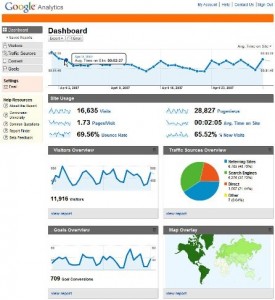
Google Analytics Example
How to setup Google Analytics on your Facebook fan pages
The workaround we use in our code is to include Google Analytics as an image instead of setting the standard Javascript. This method tracks every visitor to the custom facebook pages on Google Analytics. It required a combination of server side cookie management and an additional <img> tag to the bottom of the facebook fan page. Here are the steps to get Google Analytics working on your facebook fan page.
1) Setup Google Analytics account. If you already have one, create a new website profile. You can name it facebook.com or facebook.com/your_page_name. You will finally get your tracking code which looks like this UA-3123123-2
2) Create your custom img tag for each of your pages you like to track. EG: contact form, services, products etc. You can use our tool to create the Google Analytics link generator for Facebook pages.
3) Add the entire custom image html tag from step 2 to the bottom of each Facebook fan page that you need to track.
That is all there is to it! Google Analytics is not real-time, so you will need to give it some time. Approximately a day before you see the fruits of your “hard” work.
For advanced users
Use this method, if you don’t want to use our hosted link redirection as mentioned in the method above. You can download the entire source code which is just about three files to get this setup working on your own server (running PHP4.3 or above). The code is written in PHP and essentially creates the Google image tracking URL with the referrer, page information, ID, etc. The additional advantage of hosting this on your own server and domain is that visits from your website to your facebook fan page gets tracked, etc. You will also be able to customise further if you wish. Please do share any useful updates you apply to the tracking link code.
Facebook – Google Analytics Tracker v1.1 (Updated 21st Feb, 2010). For advanced method – Download this code to use on your server.
If you don’t have a Facebook fan page yet, visit our tutorial for code and help on creating customised Facebook fan pages.
PS: We could not find any other source / blog that described how to get Google Analytics on Facebook fan pages! There is support for canvas pages and applications but nothing for StaticFBML fan pages. Hope this helps and please leave your comments below.
UPDATE:
1) A lot of users have asked how to track visits to the wall. Yes, this can be done. Please see the comments by iphp below.
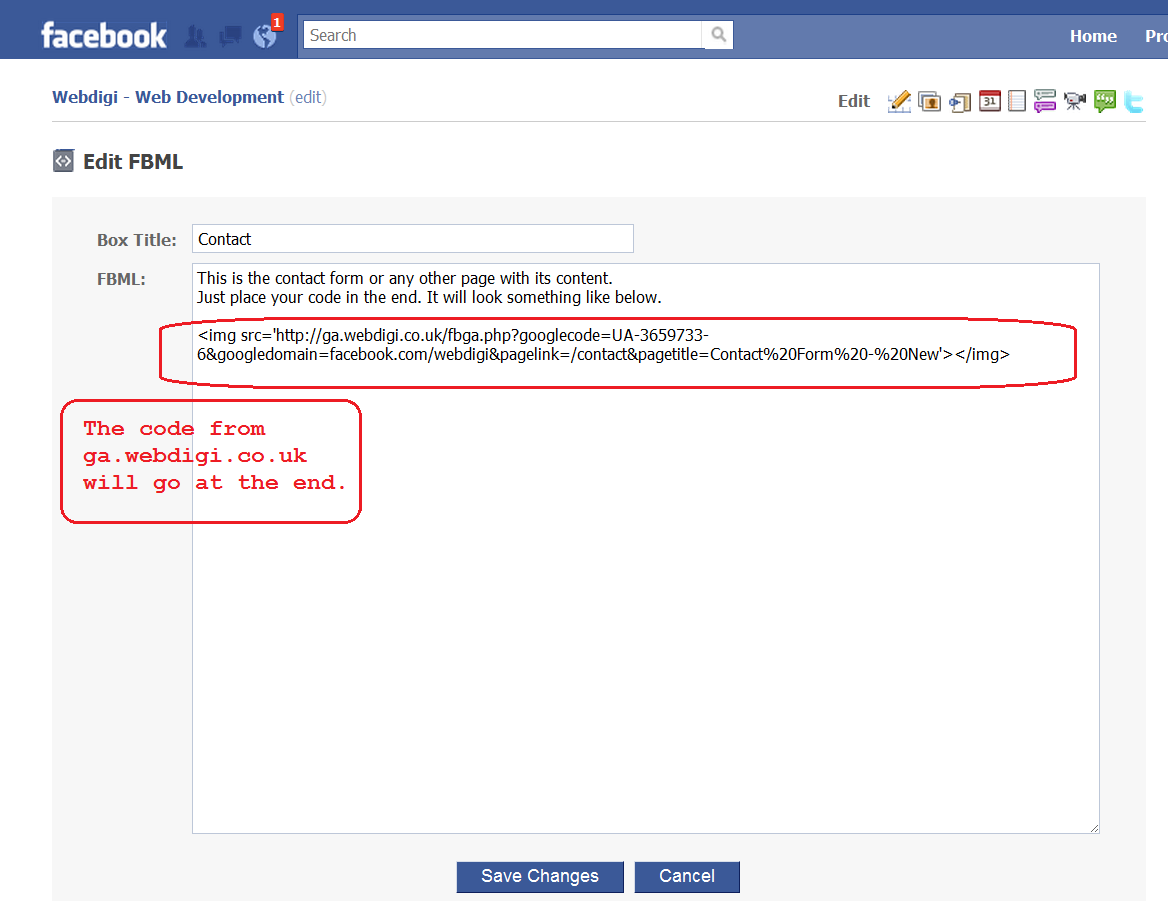
2) Here is a screenshot to a staticFBML where the code should be placed
3) We have managed to set up funnels, goals and segments to separate fan and non fan activity.
4) Video: Here is a link to the Webdigi youtube channel check our favourites to get step by step walkthrough!
5) This blog and comments cover all aspects of setting up Google Analytics. If you still want help, we are available to offer paid support and installation of Analytics for your page. Please contact us here.

Thanks for sharing. I have been waiting for a proper replacement to Facebook insights for ages.
Simply Amazing! I am sure that adding an image tag is simple and allowed by all sites. So this workaround should help with all similar sites that do not allow javascript too. Not only facebook fan pages!
Well done, I’ll have to give this a try.
Awesome, just downloaded and setup on the server and it looks ok so far. Waiting for google analytics to update.
Sounds great. @Oliver How did you setup on your server? Any particular advantages of hosting it by yourself?
[...] In this post, Webdigi details a way to add Google Analytics to your Facebook Pages. For anyone that has used Facebook Insights, the default Analytics Engine for Page, any type of additional Analytics is welcome. [...]
[...] Shared Google Analytics for Facebook Pages. [...]
[...] » Google Analytics for Facebook Fan Pages – PHP, Web and IT stuff via webdigi.co.uk [...]
[...] Google Analytics for Facebook Fan Pages Tags: Facebook, Facebook Insights, Google Analytics Share this post! Twitter Digg Facebook Delicious StumbleUpon Google Bookmarks LinkedIn Technorati Favorites [...]
Hi Guys,
Nice work here. A few questions though. On Facebook images called up from within a Fanpage Tab view are cached by Facebook. So without some sort of cache breaker (a time on the image src url will do it) your image is only going to be called the first time. No big problem there.
The real problem is that it’s not technically the end user who is loading your image. So you’re not getting any real data about that user including their browser settings etc. Nor could you do any type of cookie management during the image load.
It doesn’t look like this solves the latter problem. I’ve been through the code and don’t see anything that would seem to take care of it. Am I missing something? Am I making bad assumptions?
[...] more: » Google Analytics for Facebook Fan Pages – PHP, Web and IT stuff Posted in Web | Tags: analytics, facebook, google, pages-, php, usare, usare-google, [...]
@Grace, @Oliver If you use the advanced option of hosting the code by yourself, you will be able to track visits from your website to your fan page and back. Also preserving the original referrer to your website, etc. It might also be better than relying on our servers.
@Patrick Also, to clarify, the images generated from the server is loaded by the actual user and not Facebook. Also static FBML cannot be changed for time, etc easily as Javascript onload is blocked
On our Google Analytics we are able to see which device was used (Iphone, Android, Firefox, etc). We are able to see the location, track usage with cookies, time on pages, track visits after some time, etc. This complements Facebook Insights well. Also note that the page created using StaticFBML is static and the URL cannot be changed all the time. Let me know if you have any ideas and please do share code improvements that you make.
[...] Shared Google Analytics for Facebook Pages. [...]
Wow! This is excellent stuff! Thanks for sharing!
This sounds great. Well done. Got a client or two in mind already!
Thanks
Nikki Rae
[...] PHP, Web and IT stuff » Blog Archive » Google Analytics for Facebook Fan Pages [...]
I bookmarked this blog. Thanks heaps for this!
[...] server, you can download the PHP source and host it yourself (PHP 4.3 required). Please refer to Webdigi for more information.Just like Facebook Insights, Google Analytics doesn’t provide real-time [...]
Very interesting, Thanks for the information!!
Probably an elementary question, but “Add the entire custom image html tag from step 2 to the bottom of each Facebook fan page” — where exactly do I put the html tag? Thank you!
Great article, but I am not sure I understand where I am supposed to place the code. For example, lets say I want to track the wall on my fan page…where would I place this code? There is no way to access the HTML of your wall on facebook…
Awesome post. Thanks for sharing these knowledge bits.
Some newbie questions. I have completed two steps. First created google analytics account for Facebook Fan page and received google analytics code. Second generated Image from the UI you have shared. After that I have added FBML box to my facebook fan page and have copied the image code generated. When I have checked status from Google Analytics, I am getting tracking code is not installed message. Would you please help me on this ?
@Car, @Omar Please read the our previous article on creating custom Facebook pages. You can then put your codes there.
@Phoenix2life, Thanks! All you need is patience now. It sounds like you have done everything correctly. Google Analytics is not real time as mentioned in the post. If you come back tomorrow you should see your graphs work and you will also see “not installed” message disappear.
For those who want to test out Google Analytics, please put a link to your fanpage here you might get more visits to show up on Analytics. But please note, you have to wait for Google in any case.
[...] Sometimes I just love the Internet a bit to much. I have been trying for quite some time to run Google Analytics on Facebook but I haven’t been able to get my hack fully working and thus no post has been written about it from me. Well, in this case I received an e-mail with a post that Christian Rudolf had found with a solution to my problem. [...]
[...] more here: » Google Analytics for Facebook Fan Pages – PHP, Web and IT stuff Tags: analytics, code, custom, every-visitor, facebook-pages, image-instead, method, method-tracks, [...]
This is awesome, maybe it will work even for profile pages if you use it in some Static FBML box. But another important question – Facebook does not cache this image?
[...] Qualcuno ha però pensato di cercare un modo per utilizzare Google Analytics anche per monitorare il traffico della propria pagina fan su Facebook. [...]
Thanks, articles like this help me remember to work on FB, which I tend to ignore as just an add in. Thanks,
[...] appena appreso dal blog di Tiziano Fogliata possa essere davvero utile. L’idea è arrivata da WebDigi.co e permette di monitorare i numeri della propria Facebook Fan Page con gli strumenti di Google [...]
Thanks for this great info. Very helpful!
Does this work on forums (in signatures for specific pages) and other SNS like myspace etc. I tried in in myspace but it didn’t work but maybe I botched something.
[...] this article: » Google Analytics for Facebook Fan Pages – PHP, Web and IT stuff Share and [...]
Thanks so much for putting this out there. Hugely helpful. You made my day. I just tweeted it up big-time.
Cheers,
j
[...] Google Analytics for Facebook Fan Pages – PHP, Web and IT stuff [...]
What an interesting method. Thanks for this, I really appreciate what you have done here. Keep it up, and I will be back for more. Bill Kilner
This is a really valuable info. Keep up the good work. Mary Jo
@Jay Baer, Thanks for sharing!
@Durchánek, Facebook fan pages request end browsers to display the image directly and are not cached by Facebook.
@Uigher, Theoretically, you should be able to use this anywhere. Facebook, myspace, etc if they allow you to place img tag and if the actual user browser is loading the image.
Had a play with it now. I’ve done everything that you’ve highlighted but am I right in thinking that due to having to use FBML you can only track the pages that you build yourself? How do you view who looks you at your wall/3rd party boxes which are put onto your FB page?
Please let me know if I’ve missed something!
[...] users can click here to try a different [...]
[...] che usiamo normalmente. Senza dilungarmi troppo vi segnalo il post di Tiziano Fogliata e il post originale degli autori, dove è anche possibile scaricare il tutto e ospitarlo sui propri server per avere ulteriori [...]
@ iphp is it also possible to make a distinction between males & females in the google analytics for Facebook?
@rudi, yes this is why you would use facebook insights along with Google analytics. You can have the best of both worlds.
The post is very interesting, i would like to implement it.
Excellent post. I was speaking on a panel last night about Google Analytics and a question came up about this exact topic…really great post here. Retweeted @aybecker
Where, exactly, do you paste the image code? Did the recent Facebook redesign change this procedure?
Does anyone know where you paste your google analytics code on facebook? Where do you do this? What part of the page can this code be posted to?
Thanks for the help!
As the article points out, make sure you select create a new profile for a new website / domain in Google Analytics. If you don’t create a new profile code or exclude this data with filters from your existing profiles, the facebook GA data will come along with all your visitor / session / traffic sources data in your existing profiles… technical reason is cookies won’t align
[...] the How To Post at Google Analytics for Facebook Fan Pages [...]
Can this work with Facebook Groups?
Great idea was looking for a way to track non javascript browsers like some smart phones, if I use it on the same domain can i just create a new profile/existing domain?
It is certainly amazing that this is now possible!
[...] leerlo en Webdigi, espero les interese y comenten como les va. Tags: Facebook, Google, google analytics, Páginas [...]
Excuse my ignorance, but new to this and trying to get set up for my emplyer business page – how do I “Add the entire custom image html tag from step 2 to the bottom of each Facebook fan page that you need to track”?? Thanks
Nice job i have tried it for my blog fan pages, it work really easy.
Thanks for this great information – will try to install immediately.
@Jake, @MLO
You can definitely track visits on your Facebook page Wall as well. You will have to create a new static FBML box and place the img tag html code in it. To see this in action, Go to our fan page wall, you will see a box on the lower left called Articles which has a Google Analytics tracking code.
After you create your new StaticFBML, go back to edit your fan page. Under Application Settings for the entry you created, you can remove tab and add a box. Once a box is added it will be displayed under the Boxes section. All you have to do is to click on the little edit icon and select “Move to Wall”.
Doing the above will place your tracking code into the wall page and you will be able to track users on your fan page wall! Its easier than I made it look. Give it a go!
Genious! I didn’t know what a static FBML page was until now *blush*, but it is so simple! Thanks a bunch guys!
Haven’t worked much with Facebook fan pages (and even less with FBML) but I’ll have to give this a try. Thanks!
[...] Tracking Email with Google Analytics Google Analytics for Facebook Fan Pages [...]
Hey, I’m having problems understand this: “3) Add the entire custom image html tag from step 2 to the bottom of each Facebook fan page that you need to track.”
Where and How do I have to paste the generated code?
Any additional help on installing the files on our own server? Tried it and it generates code, however the image is broken?
Thanks!
Thanks for this awesome tip! I must admit, I’m stumped as to why it isn’t working for us. I set up a new profile in Google Analytics, created the box and published it on our wall with the img tag from your generator. What could I be missing?
facebook.com/Vmeals
Great article. I have wanted to add analytics to a few fan pages I administer for some time but didn’t know it was possible. Thanks!
Got it up and running on the wall of a facebook fan page. I assume that since the tracking is done indirectly, the “status” on google.com/analytics/settings/home should show “tracking installed”, correct iphp?
@iphp cheers, many thanks. great blog
Hi there. We are very excited to see this. We added Analytics to our page however after 14 hours we haven’t seen anything show in the Analytics. We think there may be some issue over the page name – for instance, you listed “Contact_Page”, however each of our static FBML pages have a much longer string attached. ie, our Landing Page’s string after the facebook.com is /videosocialmarketing?v=app_4949752878&ref=ts. Is this the string we add to your form? Thanks so much
Thanks for this helpful post.
I’ve integrated the tracking code within 2 tabs and the wall, it’s working fine.
But…the tracking code doesn’t seem to load every time we click on a tab. WASP is confirming this assumption. I’m on the Services tab then I click on the Contact tab but WASP keeps capturing the Services tab as a pageview.
Can you tell me if I’m right?
[...] great trick was discovered by WebDigi. submit_url = [...]
Actually, the tracking code placed on the Wall tab is always loaded, even if we are on the Service tab.
I have installed this on my server, followed the steps and added a box via Static FBML to my Wall page. But now I also have a tab on my page for the same as the box. I’d like to remove that.
Actually, what might be most helpful, would be a separate entry outlining how to get this to track your Wall visits. I think i did it right, but the procedure still feels vague (ie, I don’t know what to put into the Page Link variable, and I am not sure that I used the right thing in the Domain on Analytics var – I used facebook.com/chesterbullockphotography, which is what I entered into GA).
Can a few people go to my page so I can see in a few hours if it is working right?
facebook.com/chesterbullockphotography
Thank you.
Oh, and I should have said a big Thank You for putting this out there and letting us know it is possible.
@Meredith, don’t worry about the longer string. The strings generated for google analytics are just to help you track which pages are being visited. Give google analytics some more time also try this trick if you have not already.
For those who can’t wait for 24 hours but have waited for more than 10 hours, you might see new stats pour in. On the dashboard you can change the date range by clicking on the down arrow.
@Astrid, @Jeff, thanks and you are welcome.
@Eduardo, yes you will have to wait a while before this goes away.
@Andrea, If you want to make sure that the code you generated is correct. Just copy and paste the code within (quotes) ‘ ‘ after src= and put it on your browser. You should be redirected to google analytics and you will get a blank screen (because google image is a 1*1 pixel size. This is correct and not broken. Make sure you enter your Analytics code correctly.
I have appended this article (updates at footer) with an image showing where the code should be placed.
Thank you for the insight, I will check it our further
hi,
how do you get the proper url for your facebook fanpage.. my fan page’s url is very different…
Just tried it. Would love if some of you click this link to see if I get any tracking info tomorrow (I did this on a test page). Thanks!
facebook.com/pages/currentblend/314074708131?v=box_3#!/pages/currentblend/314074708131
Lovely! Thanx for sharing and insightful comments
Yes, the information good. Perfectly
Really useful and fresh info. Thanks!
Great article, thanks! Using iframes (this is possible in Static FBML pages via js-strings, regardless of what the documentation says) one should be able to integrate an elaborate click-tracking as well.
Hey, great article. Tried it out.. Hopefully I did it right. Here’s my fan page link to to test.
facebook.com/pages/San-Mateo-CA/Beard-Papa-San-Mateo-CA/192542081720#!/pages/San-Mateo-CA/Beard-Papa-San-Mateo-CA/192542081720?v=wall
Excellent
seems like a great way to get analytics! will try it out for sure.. FB insight is hardly any use
Thank you for this HowTo! It’s delicious!
Amazing. Code implemented as directed and capturing data 15 hours later! Great work guys!
@chrisbrashear
Will love to try and see how it goes..
This is great info, thanks! Do you know if the Analytics click tracker will work, even though javascript is not enabled? google.com/support/googleanalytics/bin/answer.py?hl=en&answer=55527
I placed this on a fairly high traffic FB page. Grace Potter and the Nocturnals (hot band you should definitely check out).
facebook.com/GracePotter
It’s on the wall and the “non yet a fan” landing page
just installed here. thanks for making this possible!!
facebook.com/pages/Vivo-Girls-Sports/191965328828
Great post, and thanks. I’m not getting GA to see that the tracking is installed. I pasted the code at the very bottom of the Static FBML page.
In GA, I set the “Website URL” to http : / / www . facebook . com
Where I’m confused is how to direct GA to the Static FBML tab page, the URL of which is “http://www.facebook.com/HYPERARTS?v=app_7146470109″
Should the “Default page” setting in GA be the full URL? I’m definitely missing something!
Thank you so much for posting this, great idea!
OMG! Love it! But why is there a slice of lemon in your latte at the top of this page, that would taste so nasty! Anyway, I will add tracking to my FB page tomorrow using this.. how awesome!
Thanks for the positive comments.
@Chris, @Cortez thanks for sharing with us that your tracking is working. It should encourage more folks to wait if they have setup things correctly.
@Keyur, to get a custom URL, you will need about 25 fans or more.
@Andreas, we think Facebook is going to get rid of iFrames in staticFBML at the end of the month. We wouldn’t be able to do what you are thinking of anyway as an iframe will not have access to the rest of the comments.
@Kati, Good thinking but it wouldn’t work as the script is complicated on Google Analytics. We will have to re-write the JS to FBJS.
@Tim Ware, We definitely learned a thing or two from your blog posts on HyperArts. Keep up the great work! I had a look at your fan page. It looks the server is returning the results correctly. Please give Google Analytics some time to show you the latest visits.
@coreytess, Try it
@iphp: Of course one cannot grab the users information dynamically, but at least you can track certain clicks this way. Tried it yesterday, works a charm. Why is it you think facebook will get rid of iframes in SF? I come to the same conclusion (which is why I did not sell this to clients yet), still my opinion/fear is not based on facts but the thought that the js-strings-technique is an exploit… Any elaboration of yours on this extremely interesting issue would be great!
Thanks
P.S. Great blog!
Such a simple yet powerful suggestion. Thank you very much for posting it.
Great workaround! It’s a shame Facebook Insights lack so many features that marketers really need to track. I’m going to give your tip a try.
Oh wow! This is awesome! Thanks for providing this valuable resource! I’m viewing my Facebook fan page stats now. Lots of peeps on Facebook Friday nites!
@iphp Thanks for the kind words! And, btw, the GA is working now. I had to log off and then back on to see what was *really* happening. Cheers….
[...] Google Analytics for Facebook Fan Pages: London-based web development company WebDigi walks through the necessary steps to make Google Analytics work for your Facebook fan page, including tracking wall visits. [...]
This is excellent! I have been waiting for something to help me track stats better than the Insights. I am so grateful to you for sharing! Also, I am currently tracking the wall. At first it read “Tracking Unknown” in GA. However, after 48 hours, I am now viewing stats. So for those of you with this message, just be patient!
This is VERY cool! We just did this in Flash a couple weeks ago and it looks like you guys are doing the same thing for FBML. Excellent work guys!
[...] At almost the exact same time that this post went live, an e-mail hit my inbox with a link to a Google Analytics on Facebook post that I failed to turn up during my research (the post is only a week old, and most of my research [...]
[...] Here is the link with How To Post at Google Analytics for Facebook Fan Pages [...]
Hi Guys
thanks for sharing that. Great stuff.
Thanks for the code…and the long and repeated explanations !
Very useful, I was looking for this kind of tool for months
Thanks for sharing this. I will definitely be giving this a go on our Facebook page.
So, all implemented and waiting for the Googlers to update the stats. Just need some traffic for that, can you guys help a little please?
facebook.com/pages/Big-City-News/137362123910
Thanks
Thanks, this is really cool! Added it to my page. The question then becomes, how (if possible) does one track paths thru the page tabs… engagement if you will?
facebook.com/street.artists
So will this track the actual people who visit my facebook profile? For instance, I would be able to see their names and the times they checked my profile? This probably sounds like a horribly obvious question, but I am not the most technically savvy individual! Thanks in advance for your answer
I’m curious if it’s possible to do this in conjunction with the stream.publish API method? We’re writing an application that allows an individual to post a custom swf to a friends wall. We like to be able to use GA to track how many times that swf is played.
Is there a way to accomplish that with this method? As yet, I have been unable to determine how to pass the necessary information through to the stream.publish method.
Thanks,
-Gary
Hello, first of all thank you for this tutorial.
Unfortunately GA is not receiving any data from my fan page (I included the image on my “landing page” as well as on the wall). I waited well over 72h.
Can someone tell me if the code on my page seems to be correct?
facebook.com/chasse.actu
Thanks in advance.
@e-chasse, I had a look at your facebook fan page. I see that you have hosted the code on your server. It looks like there is some kind of issue causing a script error. Did you alter the code? You are free to use our hosted version if you dont want to debug.
@Gary, Interesting idea, do give it a go and let us know if it works out for you.
Since I’m no developer, I may have taken the more difficult “Advanced” path, but like the idea of seeing the traffic on my domain GA as well. I copied the code into the following location: my-domain.com/fbga and modified the code to reflect that location, instead of your servers. I then went out to GA and saw visits, but assume they came from your servers before I made the switch. How, other than waiting, can I determine if I did this right?
Gr8 Post .Very Excited after reading this post .
Still not successful to configure it. Need your help
have completed two steps. First created google analytics account for Facebook Fan page(http://www.facebook.com/panchkula and received google analytics code. Second generated Image from the UI you have shared. After that I have added FBML box to my facebook fan page and have copied the image code generated(have changed the image from yours to mine). When I have checked status from Google Analytics, I am getting tracking code is not installed message. What to do now ? have already waited for 3-4 days.. my facebook fan page is : facebook.com/panchkula
@iphp, Thanks for checking my page. I tried to generate a new code and now it’s working perfectly. The only thing that differs from my previous attempt is that I changed my facebook profile from “facebook.com/chasse.actu” to “www.facebook.com/chasse.actu” (and generated new tags based on that). About one hour after adding the “www.” it was already collecting data.
Can you tell me the difference to this?
wiki.developers.facebook.com/index.php/Fb:google-analytics
Is it for Apps?
thanks
@Rob, to determine if you have setup things correctly, visit the img location on the code generated by your browser and it should redirect to Google analytics and show you a blank page
@Vishal, It looks like there is no tracking code installed on your fan page. Are you sure you have placed it correctly?
@e-chasse, That is strange but I am glad you got it working.
@Rovalou, Yes, that link is just for apps. If you need to track fan pages this is the only way to get Google Analytics working.
Great info! I have applied this to my band’s facebook page and it works like a charm!
I’m just wondering whether this would work in a similar social networking site such as Myspace? I pasted the custom image tag using your generator but it appears as a broken image on Myspace alone.
Presently we are tracking our facebook activity through our main google account. We can record visitors coming from there aswell as the ecommerce feature installed so we can see revenue generated from facebook. I’d like to gain a better knowledge of what pages, links etc are clicked on facebook to get to our site, so your method seems like we would acheive this.
However, my concern is that i wont beable to setup the ecommerce piece using your method. Do you know if this will be possible or not, or even have tried it yourself? Thanks. facebook.com/dennis.kirk.fb
You cannot add FBML to your profile. Only to a page (as the title of this article mentions). On your profile you have use “profile HTML” app – adding the google image to this box results in the image being encoded / changed as facebook caches the image. The info for profile HTML says that “facebook will alter you HTML – images in boxes will be reduced and cached by facebook”.
so no.. I dont think this works on a profile.. But it works on a page.. but if anyone can tell me how to get FBML onto a profile I will be interested to find out – or if you think it does work explain how you did it and your results
thanks
steve
[...] has not enabled their FBML tag within Facebook Pages, so a London-based web development company decided to create their own solution. By using images, there is a workaround which enables Page administrators to track everything [...]
When adding the analytics to your “Analytics Code” field on the code generation tool you’ve provided, do you just add the portion that is UA-XXXXXXX-XX, or are you suppose to add the entire block of javascript?
I’ve added the code to track both my custom landing tab for non-fans on my Facebook Fan Page, and also to track the wall of my Facebook Fan Page at >> facebook.com/SocialSEO
For self hosted WordPress blogs, you can add this tool to your own server by doing the following:
1) Download and unzip the self hosted server file provided by WebDigi
2) Unzip the file once you’ve downloaded it
3) Upload the entire folder to “public_html” directory for your WordPress blog
4) You should now be able to find the tool at yourblogname.com/fbga-version1.1
Hope this helps someone!
I don’t fully understand step 3). Can someone enlighten me?
@Corey, Please take a look at the screenshot. This is where the code will go http://www.webdigi.co.uk/blog/wp-content/uploads/2009/06/adding-img-tag.png
@ Social Media SEO, thanks for sharing your wordpress idea. I have not tested this but hope it helps someone. Also, yes, just add UA-XXXXXXX-XX to the tool.
@ ricer, This method can only be used to track places that you have access to make source code edits and img tag. Which is all of Facebook custom fan pages, wall, etc at the moment.
@ ayon, I have not tried this on MySpace. Are you sure the UA-XXXXXX-XX was correctly placed?
Thanks for all your comments, I will try to answer them as I get the time.
This is an excellent and ingenious Tool! Bravo and thank you very much for sharing!
Another cool facebook tool people might like is Facebook Purity fbpurity.com It basically cleans up your facebook homepage newstreams from all the spammy annoying stuff.
Hello! Thanks a million. Gives me very good idea of what is going on in my pages.
Hi everyone! Thanks so much for this post. I was hoping someone would come up with this solution!
I run the facebook page for a movie starring Cloris Leachman & Tara Reid called The Fields (http://www.facebook.com/thefieldsmovie). I’ve been looking for something like this to test out our marketing on facebook. I just put it on tonight and we’ll see how it goes. Thanks again so much–this is amazing!
-Jennifer
Thanks so much for the how-to. Google Analytics is still showing the tracking status as not installed – I’m hopeful that it will work though. Would you mind giving it a check? Am I supposed to see an actual image? (http://www.facebook.com/pages/Lecie-Gallery/301608373343)
Very nice article
Thank you for this! Worked great.
This same method also works for tracking Craigslist posts.
I haven’t tried it on MySpace yet but I don’t see any offending characters in the img url that would prevent it from working.
This is an excellent and ingenious Bravo and thank you very much for sharing!
I’m wondering about tracking goal conversions originating from Facebook but then converting on our primary website. Google explains how to track analytics across different domains here:
google.com/support/analytics/bin/answer.py?hl=en&answer=55503
But this requires adding 2 lines of code to the on-page analytics code on both sites. Using your hosted service does not allow us to do this. Do you think it’s possible, on the backend, for you to add the additional two lines of code?
pageTracker._setDomainName(“none”);
pageTracker._setAllowLinker(true);
Greetings, all!
Trying this out for the University of Michigan Museum of Art [UMMA].
Can you please try the following pages?
facebook.com/ummamuseum
facebook.com/ummamuseumstore
Thanks!
[b]
@Andrew, Thanks for confirming that this technique works on Craigslist! Let us know how it goes on MySpace.
@Fitz, Take a look at our new article which describes how you can track Goals, use filters, segments, etc. You might be able to use this to achieve what you are looking for. http://www.webdigi.co.uk/blog/2010/tracking-user-engagement-on-facebook-fan-pages/
I’m researching this for my own use and for an article about enhancing your Facebook Fan Pages for Small business.
But I have a few issues, non-technical people and perfectionist nancies like me, can’t overlook.
It’s unclear, and Lecie already brought it up, whether the google analytics status will change or not. Please let me know, I set mine up and I see “Tracking NOT Installed”.
Also I’d like to link your website in the article as the source, let me know if this is okay with you.
After several attempts, mine is working!
For some reason it did not like being on boxes tab and shortly after putting on wall, it started pulling in data. Wow, is this ever a great example of social networking and community. Thanks!
facebook.com/webermedia
@BeththeIMVA, Eventually (a couple of days) the status will change to “Receiving Data” and you will see a green tick which should keep people happy! We are happy to have you link to this article.
@Debbie Hemley, You are welcome, Thanks for sharing your experience.
It seems that when using code on my own server it doesn’t work because i tried yours hosted code and it works just fine.
However, here’s generation script working all fine on my server: gosocial.lt/fbga/
Have any ideas what’s the problem?
Great stuff!! It works. Thank you for sharing!
Thanks a lot but it doesn’t bring back an data in Google analytics. I reconfigured, let’s hope it works in a couple of hours.
In the meantime, I tried to add this in a text widget on my wordpress.com blog. Any idea if this could work?
Just checked that you’ve added an update for tracking wall visits -This is Super-Awesome!!!!!!!
This is awesome. Now there’s no need to invest with those companies that sell social media analytics. Thanks!
Hello,
Thank you for this awesome explanation. I think I got the first steps right (getting the code, then installing staticFBML application, then adding it/ customizing it for the page) – however, I didnt get exactly where and how many times I should CC the codes generated by your appli.
For example, let’s say I would like to track the wall and the discography page.
I then created TWO “FBML” boxes: one named “Discography”, where I CC’d the code generated for the discography page, and one “Wall” where I did the same.
Am I right? Because so far, GA warns me that the code is unknown…
Thanks in advance, and I hope I was clear enough!
Two weeks ago I added this to a Facebook page and everything seemed to be working fine, but after a week I was surprised to see that the number of Absolute Unique Visitors was still 100%. Now after two weeks the number of visits are 19 517 and the number of absolute unique visitors are 19 515. Any idea what I did wrong? I used the solution for advanced users. This is the page: facebook.com/kondomeriet
Thanks for a great post, and for your patience answering all the comments, you’re great
@ Anna, I don’t think your self hosted method is correctly keeping track of cookies. Can you please check if cookies are working from your server and it is maintaining this? The hosted solution shows a non 100% for new visits.
@Vytautas, Can you please turn on error reporting? I see you are using the advanced self hosting method. The code is not redirecting correctly.
@Anupama, Francesc, Good work!
@Alexis, you have to generate a new code for each page that you are looking to track
Hi,
@iphp – thanks for your answer, but by “page” do you mean “Fan page” (which includes several sub-pages, such as wall, discography, infos, etc.) or each sub-page of a fan page? That’s where it gets confusing.
Thanks!
A.
@Alexis, by page I mean every tab/staticFBML within your fan page. The contact form should have a different code to the one from the wall and the discography a different one from portfolio, etc.
Hello Webdigi,
First, big thanks to you guys for sharing and supporting this great tracking technique!
I’ve installed codes on every tabs and wall (except discussion and notes tabs but there’s no traffic on these pages), using your server. I’m getting data my page is facebook.com/weloveshortfilms.
Thank you very much for your help.
Can this work on normal profile pages, i.e. not fan pages, but my individual page? I cannot seem to get StaticFBML installed on it?
This is a great find, thank you!
We recently released a tool that tracks your web visitors mouse movements. There’s a lot of insight in that sort of information. It’s free, see: http://www.picnet.com.au/met There’s a few other cool features like heatmaps etc, but never thought about making it work on Facebook. Might be really useful to track how your visitors are viewing your Facebook page considering that 85% of places that your eyes visit your mouse also visits. Check in with MET over the next few months to see if we release a facebook solution. Thanks for your post.
Oh I didn;t know about it, thx for all information
Hello Webdigi and thanks a lot for your amazing solution !
Everything seems to work fine except that I get only new visits (100%) and very high bounce rates.. I’m using your server > could you help me to understand what’s wrong? My fanpage is facebook.com/weloveshortfilms
Thank you
And traffic sources are not identified properly (ex: visits from Adwords seem to be identified as facebook referral > is it something related to an automatic redirect ?
Thank you
Hi, thanks for sharing this!
I managed to input the codes for the wall page, but what about the tabs? Currently each tab is quite fixed, and there’s nowhere to add them…. Does this mean I’ll have to convert them all the StaticFBML pages, so that I can add them in?
Thanks,
Elle
We have the same WordPress theme! I am trying to figure out a way to track facebook in Google, and I stumbled on to you – Catherine
Is it possible to track user activity on non-FBML tabs such as the Info or Wall tab?
Perhaps there is a workaround?
Thanks, great work!
@Jean, how many pages are you tracking?
@Daniel, yes you can track the wall tab by using staticFBML and changing application settings to add box and removing tab.
Thanks a lot for really nice information sharing…
Thanx, awesome post! Works nice…
Just wondering: I tried to track how many users left the page via external links in my staticFBML code, so I used <a href=”http://www.example.com” rel=”nofollow”> in combination with your code… Thought this should be working but it does not. Any ideas on this?
Cheers, Markus
Ouch! Your blog swallowed half of my posted code – this is what I used to track links to external sites:
a href=”http://www.example,com” onClick=”javascript: pageTracker._trackPageview (‘/external/example_com’);”
Cheers,
Markus
@Markus, No facebook will not allow this kind of Javascript to run on facebook page. However, you should take a look at our advanced analytics page for tracking clicks
Hello iphp
I’m tracking 4 pages :
- the wall/info via “brussels short film festival” box in left column
- “concept” tab (= landing page)
- “festival” tab
- “selection” tab
(-even “notes” tab but it seems not to work)
Thank you very much for your help
Can someone tell me that GA on my page is working? facebook.com/universityofmalaya .Thanks in advance.
Hello I’m a beginner so am not too savvy with all this. So I’m following the top 3 steps… Once I get to step 3, HOW to do I put the code on my Facebook page? I don’t see anywhere to edit??? Thank you so much, this is such a brilliant idea!
@iphp, I use Google Chrome and the form kept giving me problems while trying to create the image links. Every time I clicked on a field, it kept putting focus on the `Analytics Code` field.
I re-wrote some of the HTML to fix this problem, and I also switched out the JavaScript to use jQuery (directly from Google). If you’re interested you can download the form code from here:
figmentthinking.com/ft_downloads/fbgat-jquery-index.zip
I did not repackage the full code, only the index.php that I modified.
You mention that you’re able to see traffic sources and keyword searches using this approach. I’m not clear from the code where that’s coming from. I understand how it would be possible to track things like AdWords PPC but are you able to track Google Organic (source/keywords) and Facebook search keywords? Thanks
@iphp, I agree with @Marion, I use Safari and the focus would not stay on a field in the form without clicking-holding whilst I typed in the data. Otherwise it would jump straight back to the ‘Analytics Code’ field.
Great piece of work overall though, got analytics working like a dream – thanks!
Hi, amazing technique!
This article has a lot of the FBML steps that was skipped, if you are a beginner, here is some tutorials on the subject: facebookmarketingreview.com/tutorials/advanced-facebook-page-customization-fbml
anyone able to help me? I posted april 7 with my enquiry.
Hey @iphp, first great job. Two quick questions:
1) I setup my wall with a page link of /wall. I have some unique FB apps like Web Appz, when I hit the WebAppz tab the url ends in “v=app_19827163485″ so do I create my new box with a page link of “app_19827163485″?
2) After I add additional FBML boxes and custom GA links they all show up under the Boxes tab. Don’t I need to move these to each of the unique tabs/pages that I want monitored? The only option is to move to the wall or delete, how do I get them to the proper tab/page?
Also can you check out my configuration on my wall. facebook.com/DudeImGettingMarried
Thanks
hi, the code integrates fine in my FBML, but it shows that there is a broken or missing image at the bottom of the page. How do I get rid of that, to keep my design clean?
The doesn’t actually go to a transparent gif or anything.. should it?
[...] I created a Facebook Fan page for WASP, and then followed the instructions here in order to insert the data I want to feed to my Google Analytics account. I passed in 3 values: [...]
I am still having a problem getting this to work. I’ve tried multiple methods, creating the FBML box and pasting it, and also pasting the code on the “bottom” of my page. But that is was i am not understanding, can you please be more specific on what the “bottom of my page” is? Greatly appreciated.
Thanks for your help…
Cynaera
We have developed a couple of Facebook application that we are trying to track their usage with GA. We are using iframe based apps. and have added the GA tracking code to our ‘iframe” pages. The problem with GA and IE is that GA does not track all of the IE hits! Browser distribution by GA is : Firefox, Chrome, safari, IE. We have verified GA is greatly under-reporting hits by IE.
I have read some complains about GA an IE issues but no solutions. Does anybody have experience with GA in a Facebook Iframe application deployment?
Thank you,
Gus
Thx for this really usefull information in a world of social media!
Just implemented this to test it out on facebook.com/pages/Sean-Weigold-Ferguson/112141502160971. Would love if you visited it to help me work out the kinks.
So how do I paste the code into the bottom of my pages? I there something I am missing in step 3? Can you explain this a bit better?
This is great, but am I correct in thinking that the code can only be added to the static FBML pages? And if it can’t be loaded on the “wall” and “info” pages, wouldn’t it lose track of the visitor and give incorrect data?
This really is a fantastic tool and I was excited to add the functionality that self-hosting would allow, but as previously mentioned, the package to self-host seems to have a scripting error in it. This results in the appearance of a broken image link on the facebook page. It gives a T-error on line 23 of Galvanize.php when you enter the link directly into the browser.
@Richard, Are you running PHP version greater than 5?
@Louise, to add to the wall you need to create a box which is mentioned on this page within comments.
@Andrew, Just copy the code from the FBGAT generator and put it on the staticFBML as shown on the update image.
I am not able to keep up with most comments. I would love to see you answer questions to other people awaiting answers. Or atleast sharing your positive experience to keep them going.
Is there a way to tag the rest of the tabs? Currently, there’s no way to drop the boxes into the Video, Links, and Photos tab. We have the boxes for those tabs resting in the Boxes tab- will it only pick up tracking when the user is at the boxes tab? Is there another work around to get tracking in these tabs, such as embedding code into the images that are uploaded into facebook? Please advise.
Word is facebook is planning on getting rid of the boxes tab in Fall 2010, and there will be a new platform in which to build new apps in instead of Static FBML- are their new plans in development to get GA into the new format?
Thank you, this is a great move and very well written. I successfully put a FBML Box on my Fanpage which includes the tracking code and now I am receiving data.
Thats a lot of info to take in but very informative,thanks.
Good morning iphp! I downloaded the code and placed it in a “facebook” folder within my website’s directory. from there, i used the generator to generate the code (already set up a facebook.com profile in our GA account) and added the FBML box to the wall with the code within it. The box is titled “TFT Blog”. I saw in one of your comment posts to type in the url and it should redirect you to google analytics. The link isn’t redirecting, only takes me to a blank page but still under our domain and the FBML box on our page show’s a broken image icon. when you have a chance, i’m curious as to what i may be doing incorrectly. facebook.com/topfloortech – thank you much in advance!
@Cassy, Please use the hosted version, there is something wrong with the image URL. Are you sure you are running a PHP version greater than 5? Please turn on error reporting there definitely is some kind of error. Ideally you should get redirected to Google (and shown a blank page) when you visit the FBGAT link on your browser.
Great tool – also useful for hosted WordPress blogs
[...] adding Google Analytics to your Facebook Fan page were inspired by and learned from web posts by WebDigi and Social Media [...]
[...] FB Insight is alright, but in comparison to Google Analytics, it won’t get you far since those Stats are only about fans. So, if you are not afraid to get your hands into the dirt, you will use Google Analytics to analyze your FB stats. Yep, it’s possible. Follow the guide. [...]
Great, thanks a million for this. Tracking all my visitors perfectly!!
I installed fbga on a custom tab application which facebook caches the image. Will that affect the results? Should I add a datetime variable to the end of the url or will it work as is?
facebook.com/pages/Jake-Night/125934074087372?v=app_123865557631259
Well, probably a silly question, but… HOW can I add an image to the bottom of an fb fan page?
Ok, I was able with “Static FBML”.
Now, tell me: “/” will refer to the wall page?
Or do I have and use “/wall”?
I cant thank enough for this!
I’ve added a static FBML box to my wall but it looks like all the code has been escaped and the image is loading. I’ve got the image in the “Thanks For Visiting” box in the lower left of facebook.com/pages/Fayetteville-AR/Township-Baptist-Church/89000767842 . Did I skip a step somewhere or is there a box to turn the escape off?
Thanks for the great tip!
@Clacton, Awesome, glad you got this working, thanks for reporting back!
@Brandon, For applications (canvas applications), I suggest you use Fb:google-analytics. If you search developer documentation or on Google, you will get answers to this. If you prefer to use this, yes you need to add variable
@Paolo, / or /wall should do the trick. I prefer /wall. It looks like you figured out how to add image to the bottom of the page. A screenshot is at the footer of the actual article, before comments.
@Collin, I visited your page and it looks like things are working correctly, you should see logs appear on Google Analytics soon!
big thx to you, awesome info!
hey there, i got it working perfectly, but i tried it on a page with seo-friendly urls first. now i wanna integrate it into a page with smaller amount of fans and crappy urls. how deep should i define the url path? is like
/BlaBla ok?
or do i need /pages/BlaBla ?
or even /pages/BlaBla/101963159841418
or (! one more, sorry^^!) /pages/BlaBla/101963159841418?v=app_4949752878 (in case there is an app)
still big thanks, for seo frndly urls working perfect.
Thanks for the post, it works great!
@erik, Anything is file /BlaBla should work correctly. Please remember to create a new Google Analytics profile and code, if this is your second it will look something like this UA-9292929-2, A 2 in the end.
hey @awesomeness : thx, thats probably why its not working
Got this working great. Thanks for the cool tip! I can even see visits to my wall that isn’t an application. Anyone got ideas about how to continue tracking wall visits after Facebook removes boxes from it?
I was using an old tracking code related to the fan page and the tracking information wasn’t showing up. When I created a new profile in Google Analytics and used that instead, it started working again. I’m still not sure how to get a different code on the Wall and Info page though.
Thanks!
This is cool. One question I have is enabling FBML on standard tabs like Discussions, Photos, Video, etc. I want to track analytics on such tabs but not sure how/where to insert the code unless I’m overthinking things!
Hi all,
I need your help.
Im customizing a fan page with 2 new tabs (newsletter, shops)- Each tab is made with a img that links to the website. Does UTM parametres (source,content..) works in the fbml code?
Plus, I have some questions for the generator code
Analytics Code: is the one of my website (already existing) or the one of the new analytics profile facebook.com/myfanpage)
Domains on analytics: is it mywebsite.com or facebook.com?
page link: is it the link (ie /newsletter.php) linked to the img in the tab?
Thank you
First I wanted to tell you that you made a grate product
Second I have several facebook pages of US brads in Argentina, the thing is in some of them I am receiving a lot of visits for the US, even more that form Argentina, to me this seems strange because the pages are in Spanish and targeted to the argentine audience.
I been looking in the data and found that most of the visits from US come from facebook inc as a service provider. Can it be a that facebook has cached my page? Or are there really facebook employees?
Wonderful! You guys are the bee’s knees.
Does this work for just a regular Facebook page? rather then just a fan page? and where in the bottom do you insert the code?
I´ve installed the tracking code in my client page and it works perfectly!
My doubt is in GA the information about “time on site” is 00:00:00 and you said that this info is working.
Any issues with that?
facebook/animalebrasil
TKS!
Does the advanced method (i.e. installing on our own web server) allow tracking of referral paths other than just referrals from our own website? I.e. can this method be used to track what other websites referred visitors to our Facebook page?
[...] found this site a few weeks ago, while looking into some Facebook reporting issues – a rather simple app [...]
[...] [...]
[...] Google Analytics for Facebook Fan Pages Another great post by Webdigi.co.uk, in which they show you how to get around Facebook’s limitations. Even though Facebook supports only restricted JavaScript, which is usually not enough for Google to correctly track visitors, the guys from Webdigi.co.uk successfully managed to get all functions of Google Analytics working on their fan page. You can learn how they did it by reading this tutorial. [...]
Great Blog post!! I just did this and it was easy as pie!! thanks for the info.. I will pass this on !!
Joanne DelBalso
@nofussacctng
Hi, great job!
Can I use fgba for tracking email marketing campaign?
It’s seam that’s possible… it’s like the classic gif insert method
Domain on Analytics: mydomain
Page Link: alternate-webpage-url-of-email-HTML/newsletter-date.html
Page Title: newsletter-date
[don't need GA-code in the alternate page, keep the img gif code]
Thanks you very much, very usefull
Regards
@dmsr
Thanks for sharing!
Cheers,
Stuart
Thanks a lot for this I followed your directions and I am getting the “Tracking Not Installed” error code, I will give it some time and see if it starts working. Once again great blog post and thanks
Chris
@lifterCatcher
Here is the link to my fan page to hope to get some clicks to see if this is working.
facebook.com/pages/Our-Fitness-Journey/158321227279?v
Update: after a couple more hours, the GA registered the feed. I’m anticipating my first daily report in an hour!
Thanks again!
Hi,
I have tried this over and over and I guess I’m doing it wrong because I still can’t get the reports to start. Here is what I have been putting into the FBGAT code generator:
Analytics Code: Check, I have that.
Domain: facebook.com/wsuspokane
Page Title: This is where it’s confusing. I don’t know whether to put “WSUSpokane” (the fan page name) or “Cougs” (the name of the box the code is in).
Page Title: This is confusing as well, page or box?
Any help would be appreciated, but it doesn’t look like you are answering comments anymore.
Cat
@ iPHP, though it might seem logical that using fb:google-analytics on a canvas page would be applicable on a profile tab, too. Hopefully, I can save someone some headache, or maybe they could tell me what I’m doing wrong. But your tracking method worked, and I said no more need to beat my head against the wall.
@Chris, @Stuart, @Nate, @Joanne, @Hubert.
THANKS! Thank you for your comments. I hope this encourages people who are nearly there with integrating Facebook to
@Cat C.
Sorry for the delay in replying. We have been really busy. I hope you have already figured out the issue. Can you please post the link to your facebook page? Page Title does not matter, it is just to help you identify the page when you see the reports.
What a great solution. I’d like to try it out, if anyone can give me a hand just by visiting the page so I can see if it tracks in a few hours. Thanks again!!
facebook.com/shotinthedarkmysteries

Leigh Clements
Shot In The Dark Mysteries
Heads up, FB is killing boxes = no more GA for the Wall. Anything in the works from Webdigi?
Thank you for all of your help. I’ve been able to set up analytics on the Wall of my page and am tracking visits, but so far the Overlay function doesn’t seem to be working. Is there anything special that needs to be done to set it up?
Thanks!
Thanks to your post successfully implemented Google Analytics to our fanpage’s wall. So far it has been working perfectly!
Dear iphp,
Thanks for the tutorial. It works everywhere except on my wall.
I put the code in a FBML with some other info so that the box would show up.
Under Application Settings I removed the tab and added a box.
But the next step:
“Once a box is added it will be displayed under the Boxes section. All you have to do is to click on the little edit icon and select “Move to Wall”.”
I dont know where i can find that. can you discibe this some more? Maybe add a screenshot?
Thanks!
ah amazing! I didn’t know we can use Google Analytics for Facebook Fan page!
Now I will try to use it!
Thanks to your post successfully implemented Google Analytics to our fanpage’s wall. So far it has been working perfectly!
Great followed the tutorial step by step yesterday and it works perfectly on all pages & wall for me!! Thanks you guys are amazing!
Facebook is planning on removing boxes from profiles. I know the code will still work on the tabs but do you have a solution for tracking wall visits without boxes?
It all makes sense up to step 3. I don’t know how you just put an image at the bottom of a page on facebook, I have no control of the layout of facebook, or editing the html. I need a bit more explanation of that step please.
A-W-E-S-O-M-E thanks for offering this to the open public.
Question, can I somehow pass custom “user variables” to GA? Whether using the hosted version or tweaking the self-hosted?
Thanks!
@Leigh, @Beate, @Isan, @Jenni
Thanks for taking your time to comment on your success. This will certainly encourage people who are getting started.
@Aimee
To put an image on the bottom of a page on Facebook, you need to setup Static FBML to be able to do this. This is how your staticFBML page will look like. webdigi.co.uk/blog/wp-content/uploads/2009/06/adding-img-tag.png
@Hector, Absolutely, you can pas your custom user variables to GA. You have to tweak the self-hosted version. Please keep in mind that all you have to do is to generate the correct URL and things should work. Please let us know if you manage to get additional analytics information, we can probably add it back into the hosted version for the public.
Thanks! Will definitely share it back if we get it working. Again, thanks for sharing this with everyone.
[...] Google Analytics for Facebook Fan Pages Another great post by Webdigi.co.uk, in which they show you how to get around Facebook’s limitations. Even though Facebook supports only restricted JavaScript, which is usually not enough for Google to correctly track visitors, the guys from Webdigi.co.uk successfully managed to get all functions of Google Analytics working on their fan page. You can learn how they did it by reading this tutorial. [...]
[...] and are hosting some FBML code on your own server, you can use this technical workaround to add Google Analytics to your Facebook Page. The programmers who created this also provide a Google Analytics link generator to help you [...]
[...] and are hosting some FBML code on your own server, you can use this technical workaround to add Google Analytics to your Facebook Page. The programmers who created this also provide a Google Analytics link generator to help you [...]
[...] Below is the article, originally posted here. [...]
@ipha -
How are you able to track wall visits now that boxes have been disabled?
Thank you very much.
Dear iphp, I’ve read all this blog and there is excelent information. Thanks, but I got an issue, when you posted before that to track the Wall you need to add a staticFBML to the wall changing the settings adding a box and remove tab is where the troubles comes up. When I go to settings only the TAB configuration to add or remove appear, nothing about to ADD BOX only to add or remove TAB. How can this be configured or changed?
Thanks!
[...] and are hosting some FBML code on your own server, you can use this technical workaround to add Google Analytics to your Facebook Page. The programmers who created this also provide a Google Analytics link generator to help you [...]
Screencast: How to Add Google Analytics to Your Facebook Fan Page
craftyman.net/google-analytics-facebook/
Facebok got rid of the boxes!
Is there a way to track the wall now?
I don’t see any!
Please deny me
Thanks for sharing this. I knew it was just a matter of time.
Is there a way to track fanpage Wall (as BOXes are no longer available)?
Hello,
This article is really interesting. Thanks for sharing this tips.
But I still have a problem for tracking the wall activity.
How do you do to put the code on the wall since Facebook remove the box?
Have you fin a work around?
Tx for answering.
Have a nice Day,
Ben.
Hi, It seems it’s no longer possible to create a box for FBML pages I only have the option to add the page as a new tab. Is there any other way to tag my wall without using boxes? cheers, Rudi
[...] Google Analytics for Facebook Fan Pages Technique to get ALL functions of Google Analytics working on our Facebook fan page (including visitor statistics, traffic sources, visitor country, keyword searches with all other powerful reporting & maps overlays etc). (tags: googleanalytics analytics facebook fanpages) Posted in: Dailies ← links for 2010-09-03 Be the first to start a conversation [...]
Now Facebook does not allow to customize the wall. How can I put the code?
[...] compared with Google Analytics, this level of detail is painfully vague. So, some clever folks figured out how to integrate Google Analytics, via FBML. This is still doable, if you’re looking to create custom pages using FBML (an interesting [...]
Hi guys,
seem like facebook has disabled the box option in fmbl so I am not anymore able to post the code on the wall. Is there any workaround to it? Thanks. G.
I wonder if it would be possible to put the IMG tag as your profile pic?
Perhaps I am dumber then I actually think I am.
Hi, I’ve read everything in this post, very useful. The issue I got is the need to track the wall in Analytics, I’ve read that changing the settings of the static FBML to ‘Add Box’ and ‘Remove Tab’ but in my settings it does not appear, only appears ‘Add / Remove Tab’ how can this be done. Any help is very appreciated and thanks for saring this with the world.
Thrilled I found GA solution. I totally understand where to embed Your generator code on page(s).
Server side upload: would that be the actual GA code generated by Google or
the one that I got from your Generator?
Please Advise
Where do I paste the code? I need help.
Facebook has removed the Box. Does this mean we can no longer track the Wall? Or I’m missing something?
Thanks!
Hello,
Have you found a new way to track FB pages with Google Analytics now that FBML boxes are no longer available on FB ? I’d be very interested to know !!
Thanx
guys is it possible to Modify the script to work with Other Analytics Providers ? I don’t want use GA
[...] and are hosting some FBML code on your own server, you can use this technical workaround to add Google Analytics to your Facebook Page. The programmers who created this also provide a Google Analytics link generator to help you [...]
[...] quedará probar el super conocido código del pixel de Google Analytics para Facebook, no es la opción ideal pero por lo menos debe aportar más información que no medir [...]
Somebody please tell me is it possible to do same thing but for user profile at FB?
Excellent tip. Any new solution for tracking wall visits now that Facebook got rid of boxes? Thanks!
I was trying to add analytics for facebook pages but couldn’t completed the process please show the step by step procedure for this…
thanks
[...] Track Facebook Fan Pages including Google Analytics. See here: webdigi [...]
[...] Google Analytics for Facebook Fan Pages – PHP, Web and IT stuff [...]
Thanks for sharing the info. its nice to see a proper replacement to Facebook insights for ages.
[...] Analytics sulle FAN page di Facebook! In questi giorni su molti blog viene ripreso questo articolo come fosse la rivoluzione [...]
Hi,
I was wondering why you’re working with: utma, utmb, utmc and utmz. If I use your script within my tab-app Facebook doesn’t track referals either, do they?
@Fabian Once setup correctly google analytics tracks referals, country, visitors and you can even set in-page analytics (new feature on google analytics). In short it should work just like google analytics on any web page / website.
@php-manual: Thanks, I tried to refactor and improve this whole thing and I don’t understand these lines, but i ll try to implement them either.
What’s with this comment? Did you fixed this?
// Problems with duplicate array keys here!
[...] I think I’ve seen yet. Obviously Facebook is extremely limited in how you use FBML. These guys, however, figured out how to pass analytics through an image tag and have it execute independently [...]
It seems I need some help! And I seem to have lost some of the pages with instructions and don’t know where to go to get them…
Dudes, can you please contact me for merging our sources.
[...] Google Analytics for Facebook Pages (webdigi.co.uk) [...]
cool
this really works!!!!!
good!
AWESOME!!!!
thanx
Great. I think that it’s best to know who has visited me.
Great. Thanks
good to know
Thanks
totally awsome
Great!It is a good think!
This is great
I have setup google, generated the code, but as usual, facebooks stumps me. I setup and FBML page, but cannot add or insert the generated code anywhere. Can you please help me and walk me through why I cannot have a proper FBML page I cannot edit?
Thank you very much.
E
great!
terrific
thanks
good article
[...] savoir plus sur l’activité de cette page et les interactions de vos fans ? Le blog anglais webdigi web-development nous indique la méthode à [...]
[...] • Installing GA code : Fanpage does give limited information about the visitors to our Fanpage through the Insights. But the information that is provided is completely restricted to the interactions with no information about the visitors. Google analytics can give you detailed demographic information about the visitors to our Fanpage. Now we can get complete analytics information of our Fanpage by following few additional steps. All we have to do is to install the Facebook Google Analytics Code (FBGAT), and easily apply the GA code to the Fanpage. For detailed information click here [...]
good going!!!
Wish I could track outbound clicks on my FB page. This will only track visits. Great solution though and one of the few around. If anyone has any advice on how to track outbound clicks on a FB Fan Page, I (and everyone here) would certainly welcome this info!
Thanks!
@Jason, Yes you can track outbound clicks on a FB Fan page. You can do much more on Google Analytics, please read our advanced article on Facebook Google Analytics
All visits are tracked perfectly for me. Thanks so much for this awesome work!
Hello!
This open source tool and all your hard work is much appreciated!! Thanks for sharing and for being so active in the comments and questions people have posted. I have 3 questions for you and/or the readers out there.
First, I was curious about filling in the form for the code generation, as well as the info you put into GA on signup.
In GA: do I put the domain I want analytic for as “facebook.com” or as “facebook.com/myPage” ? does it matter
as for FBGAT, when filling in the ‘page link’ field it appears you use a partial URL (ie. “/subdomain.html”). But what about small additions to the URL(cant think of a better way to describe :S )? I’ll give an example. Do I enter:
/ColumbiaCanada?v=app_7146470109&ref=ts
or
/ColumbiaCanada?v=app_7146470109
Secondly, how can this be made to work for tabs that ‘come with’ the Page (ie. wall, info, etc.)–by which I mean tabs that you cannot edit through FBML tab?
Finally–just so I understand more fully how this method works–you guys are sneaking GA onto the page by tracking the image that will be added to the page (I see a small ‘broken’ image at the bottom of my page when I add the code). Is your method, essentially, using GA to grab info about the image being loaded/accessed on your FB page, and using that as a proxy for tab visits?
Hi there
Apologies, I’m a bit of a novice! I’ve followed the steps above for adding google analytics to my facebook page, but…
How do I actually do this?:
“Add the entire custom image html tag from step 2 to the bottom of each Facebook fan page that you need to track.”
Thanks!
Hi @iphp thank you for this article!
i wanted to ask you something about the installation:
1.i downloaded “Facebook – Google Analytics Tracker v1.1″
2.i made a directory on my server and placed the folder.
3.i went to index.php
4.i genertaed the code.
now one thing ive noticed is that my generated code looks different from yours:
*****
*****
—–> index.phpfbga.php? are sticked together and when i generate this from your host it shows only fbga.php? without index.php
will this cause any problems?
thanks heaps,
Daniel
@dmac Yep, you’ll need to change that line. It’s calling a file to pass parameters to. index.phpfbga.php isn’t a real file, so this will produce nothing. You’ll want to change it to fbga.php (remove “index.php”). HTH.
thanks for the great work
good going
how do you do this?
Great help!!
thanks for the info very helpfull cheersssss
Very interesting…
This is really good info.
this is a really great idea.
Yep, brilliant!
wtf!!! this is just GREAT!
yep it’s great
it’s awesome
Informative comments for those who wish to access this info
Thanks this is great….nice to know if a certain person wants to contact me…appreciate your effort in developing this app
this is a good idea
briiliant
Nice one
This is totally brilliant, thanks for opening up to the world.
Has anyone tried tracking the Wall page since the Facebook introduced the New Layout? I don’t see a way to load the FBML on the Wall anymore. Anyone come up with a workaround?
yep/brilliant
@ iphp
I haven’t read all the 313 comments to telling you the truth ; ) but I was looking for the information on how to set the image I prefer (among your gifs) to load on the fanpage tab – I’m using the FBGAT pack on my server.
Please give me a hint! ; )
What social media tools (like Radian6, SM2, etc) cost less than $500/month?…
There are so many tools at your client’s disposal which are free. It would be useful to ascertain the product/ what your client is trying to measure, and then split them into tools to measure; * Client profile online * Competitor profile online * Comp…
great STUFF!!
@iphp
so, since facebook removed boxes, we can no longer use this to track visits to our wall???
good info!!!
Hi
Brilliant posting, I have been designing facebook pages for some of my clients, will certainly look to add this functionality to the pages.
Site bookmarked!
iphp –
Fred on 1/12 asked “Has anyone tried tracking the Wall page since the Facebook introduced the New Layout? I don’t see a way to load the FBML on the Wall anymore. Anyone come up with a workaround?”
Does your suggestions work with the new layout. I think this stuff is some of the most brilliant stuff I have read in awhile. Thanks for the updates.
stapuff106
[...] If you do not know how to create img code for your facebook fan page create your img code from this website; Img Tag Creater [...]
@Gabriele: I couldn’t add a box to the new fan page layout … Maybe I’m missing something. Weren’t they supposed to be discontinued anyway? Anyone got an example?
Also, as far as I can tell, facebook is running the images through it’s proxy … so no direct link us/google … Can someone clear this up please?
I have same problem that Fred and Kurt.
I need new solution about the Google Analytics on Wall of Facebook Page.
@Kurt – with the new layout there are no boxes anymore. This means, there is no way to integrate StaticFBML on the main wall anymore – which is a bit of a shame – this method would have been a really good insight next to the Facebook page insights which don’t show very much details.
@sam Steiner
You are right , there is not more boxes now
[...] Want to know how to get Google Analytics onto your facebook fan page? The guys at Webdigi have the answer. [...]
Hi There,
I have a question. I made an custom image html tag and have to add this to the bottom of eacht Facebook fan page that i track. But how do i do that?
Can someone help me?
Thanx,
Leander
[...] Google Analytics for Facebook Fan Pages Another great post by Webdigi.co.uk, in which they show you how to get around Facebook’s limitations. Even though Facebook supports only restricted JavaScript, which is usually not enough for Google to correctly track visitors, the guys from Webdigi.co.uk successfully managed to get all functions of Google Analytics working on their fan page. You can learn how they did it by reading this tutorial. [...]
Nice Post! Very informative.
Has anyone come up with a solution to track the Wall page since the new layout?
Facebook should look into providing this feature
Kudos
@ Kurt – So basically you are saying that this method is not longer applicable to track the wall right?
I tried to set it up and I was able to get it working for a static page. However the StaticFBML is no longer available for download directly from Facebook. I got it here and was able to track a new page, which I called “myPage 1″ but this is not very handy as most of my traffic comes from the wall.
Has anyone found another method for integrating Google Analytics into their wall page?
Great resource by the way, pitty it can’t track the wall anymore.
[...] Google Analytics for Facebook Fan Pages Another great post by Webdigi.co.uk, in which they show you how to get around Facebook’s limitations. Even though Facebook supports only restricted JavaScript, which is usually not enough for Google to correctly track visitors, the guys from Webdigi.co.uk successfully managed to get all functions of Google Analytics working on their fan page. You can learn how they did it by reading this tutorial. [...]
[...] fans, friends, and comments on your page. You can also use tools like Facebook Insights, and even Google Analytics to get more detailed metrics, like demographic & location data, number of page views, and [...]
Not a techie and I got it going so thanks a ton.
HI,
Actually I want to track and have it in my Google Analytic account each time a member click on the facebook link on the newsletters.
Yes I generate the code for facebook tracking and I paste it on the bottom before the end body.
Is it mean if I clic in an any facebook link on my newsletters it ll show on GAnalytic
[...] This may be old news to you, but I just found out about it! Super excited that you can embed Google Analytics to track the traffic to your Facebook Fan page. Here’s the link. [...]
[...] has identified a bypass which will enable you to get all functions of Google Analytics working. Click here to read more about this Fan Page Monitoring [...]
Please tell me how to add this code to the fan page.
Great stuff! Implementing right now.
hi,
I read Complete article, this article very antic and interesting.
i like it..
thank for sharing experience.
[...] the past, there were a number of methods for trying to track Facebook using Google Analytics. None of them worked particularly well (for a bunch of boring technical reasons like image caching [...]
How to add code google analytics to Facebook fanpage user tab Iframe. Not user static FBML
[...] more analytics than Facebook provides? You can port Google Analytics into your Fan page. Here is a step-by-step article on how to do [...]
Good article, Im not a code ninja but I get de meaning of your post, is simple.
[...] solutions de tracking analytique pour Facebook commencent à apparaître. En voici une pour Google Analytics, et, si vous avez les moyens, et 2 ou 3 ingénieurs informatiques sous la main, celle [...]
Thanks, I have been looking for a good tracking method, like Google analytics!
[...] Des de que Google indexa les actualitzacions i les pàgines fan de Facebook, podem mesurar les estadístiques d’aquestes pàgines col·locant Google Analytics al nostre Facebook. [...]
[...] Google Analytics for Facebook Pages [...]
thank u very much,I spend time finding this information
am amazing!didn”t know we can use google analytics fan page! Now I will try to use it !
[...] server, you can download the PHP source and host it yourself (PHP 4.3 required). Please refer to Webdigi for more [...]
Many thanks for the interesting and useful article. I like it much.
One of my concern is that how to track wall page now because Facebook doesn’t support box and Static FBML anymore?
Thanks again.
[...] we explain how we built a carousel, navigation tabs, forms, etc on the Webdigi Facebook fan page. Google Analytics for Facebook Fan Pages Setup Google Analytics account. If you already have one, create a new website profile. You can name [...]
I pasted the code in to my facebook page. But I still get a notice saying “Tracking Not Installed”. Please help.
[...] Google Analytics for Facebook Fan Pages Another great post by Webdigi.co.uk, in which they show you how to get around Facebook’s limitations. Even though Facebook supports only restricted JavaScript, which is usually not enough for Google to correctly track visitors, the guys from Webdigi.co.uk successfully managed to get all functions of Google Analytics working on their fan page. You can learn how they did it by reading this tutorial. [...]
If Im not mistaken there are more than 700 000 people on this great ball we are living on. There is always a reason why the rest dont have a FB Profile. Many because they dont have access to an internet connection.
I believe that Google’s users will come from this source, a new generation as well as some who find Google+ to be more suitable for their needs.
I’ll stay with FB for now and be a happy tester for Google+.
Let’s see…
Hey,
First off great job! Very sick tool….I’ve already successfully used it on an FBML page…however, I thought I’d I’d play around with it on a reveal tab. Everything is set up as it should be (img file is embedded on the nonfan.php to display for users who visit the page and haven’t yet liked it). However, google is locating it? Any suggestions?
Wow, Great feedback and comments which are much appreciated on my part. I hope you continue to enjoy my future posts and let me know it you want to engage in an interactive online blog?
Hi,
Does your method work with iFrame Facebook Tabs ?
Thx for your answer
[...] Check it out here Google Analytics For Facebook [...]
[...] keep your company in the minds of your clients. Uncover A lot more Promoting On Facebook Articles Need to my business set up a Facebook page? Facebook is the social networking internet site which a…r/> Need to my business set up a Facebook [...]
Whats up! I just wish to give a huge thumbs up for the great information you have here on this post. I might be coming again to your blog soon.
Heya i am for the primary time here. I came across this board and I in finding It truly helpful & it helped me out much. I’m hoping to give something again and aid others such as you helped me.
[...] Creative Ways To Increase Your Facebook Fanbase All Facebook – The Rise Of The Facebook Start PageBefore I dive into this week's Podcast – I wanted to report back on a great day I spent with Deborah…t to see her talk on the Friday night, but did get to see the sites with her and get very wet in the [...]
So how do you add it to the Facebook Wall? You can’t add it under About or General Information, so where would it go?
Magnificent site. A lot of useful info here. I’m sending it to some friends ans also sharing in delicious. And obviously, thanks for your sweat!
I will recommend this article to my friends. This is a must read!
hi.. i’ve followed the steps
1. generate google analytics image code
2. paste the img code to below my static fbml page
3. went back to google analytics next day.. it is showing clicks
This is the page where i installed the code facebook.com/pages/FitzforLife/168769133152483?v=app_4949752878
Tnx.
Hi, for those of you wondering how to add the FBML static page – use this link below as the FBML application is no longer listed in apps that can be added within facebook. Using the link allows you to add the FMBL Static page
facebook.com/add.php?api_key=fdfd01c9df7d644a68a4e989ae861e44&pages=1&page=102938863123295
Also, my attempt to get this to work has failed. I’ve tried a few variations, but none seem to work, could this be due to the new facebook layout?
I’d appreciate an answer to this, so I stop wasting my time if this tracking no longer works.
Thanks
Interesting, Thanks!!!
[...] which are making all these Facebook fan page features possible are really having a field day!Facebook has been around for some time now, and online marketers have long since realized the vast p…al potential of Facebook has really come out to the fore. Internet entrepreneurs have now become [...]
[...] can follow their page on how to install Google Analytics for Facebook [...]
FBML will not support after Jan 1, 2012, so what’s the new way to track Facebook with Google Analytics?
We are a gaggle of volunteers and opening a brand new scheme in our community. Your site offered us with helpful information to paintings on. You have done an impressive task and our whole community can be grateful to you.
I feel this is one of the most vital info for me. And i’m happy reading your article. But want to commentary on some common issues, The site taste is wonderful, the articles is actually nice : D. Just right activity, cheers
Thanks for sharing this info
It’s the best time to make some plans for the future and it’s time to be happy. I’ve read this post and if I could I want to suggest you few interesting things or tips. Perhaps you could write next articles referring to this article. I desire to read more things about it!
[...] • Installing GA code : Fanpage does give limited information about the visitors to our Fanpage through the Insights. But the information that is provided is completely restricted to the interactions with no information about the visitors. Google analytics can give you detailed demographic information about the visitors to our Fanpage. Now we can get complete analytics information of our Fanpage by following few additional steps. All we have to do is to install the Facebook Google Analytics Code (FBGAT), and easily apply the GA code to the Fanpage. For detailed information click here [...]
An fascinating dialogue is worth comment. I believe that it’s best to write more on this topic, it might not be a taboo subject but typically individuals are not sufficient to talk on such topics. To the next. Cheers
[...] Content Taking Your Static FBML Microsite to the Next Level Creating a Custom Facebook Page Google Analytics for Facebook Fan Pages How To: Build a Facebook Landing Page for Your Business Internet Explorer and Static FBML: Using [...]
Good editorial. Sustain up the first rate work.
Hi, Just Creating myself a page… everything here looks simple enough and I’m just waiting for the Tracking Status to update (tomorrow now I guess). However what kind of stats will I be expecting to see? I’m figuring Just actual hard figures?
And certainly not Actual Users Names, or IP’s…. Hope not anyhow.??? Anyone???
[...] crea una cuenta de Google Analitics. Después descarga FBGAT . Después sigue los pasos descritos aquí para añadir el código de seguimiento de Google Analitics a tu página de Facebook. Conocimientos [...]