Machine learning and AI have come a long way over the last decade. We are able to run powerful machine learning algorithms right on the browser. Incredibly this even works on browsers of mobile devices like iPhones and Android devices. This can lead to interesting applications: Multi-factor authentication, Captcha systems, Login & many others.
We have two great demos put together with Machine Learning libraries on the browser.
Hand tracking
Vulcan hand salute to login
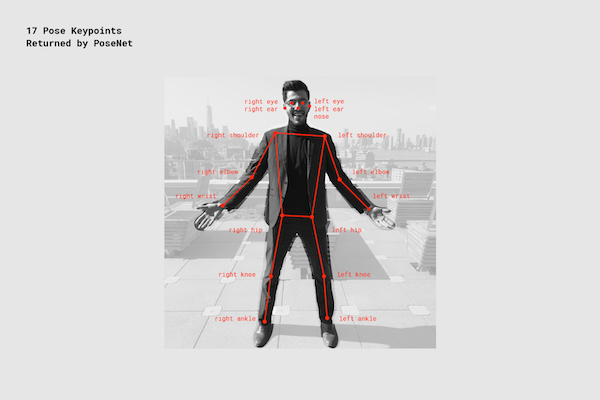
Pose Tracking
Once you click on any of the two pictures, you will be taken to the demo. Please try them out and let us know what you think.
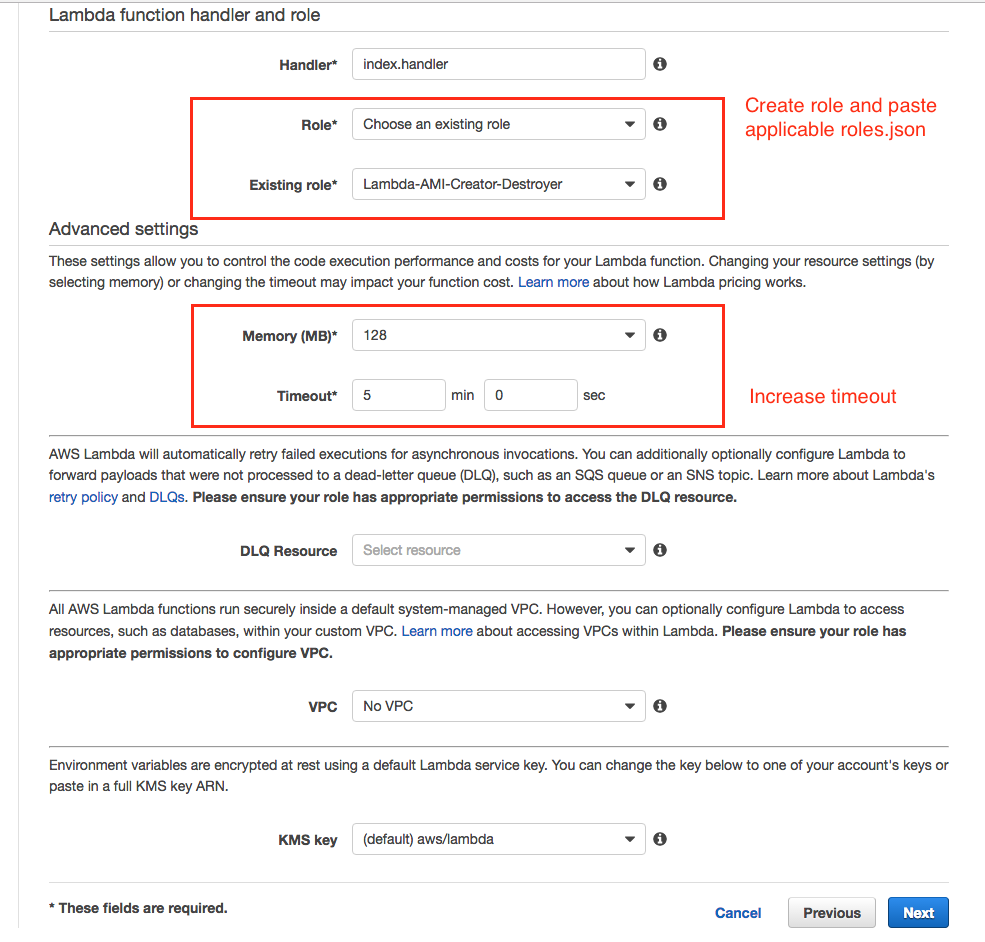
UPDATE: 14 JUN 2017 – In step 5 below, please do select 5 minutes timeout for the script. We did have a few issues for users who had a lot of instances taking over the standard 2 minutes for the script to run.
Creating an AMI automatically snapshots all the associated EBS volumes for that instance. This makes instance recovery much more reliable and faster. A daily or weekly backup schedule is recommended for instances and to make sure you have a backup if ever needed. The system also removes the automatically created AMIs and any associated snapshots as per the settings.
Setup / Installation of the Lambda script (one time setup)
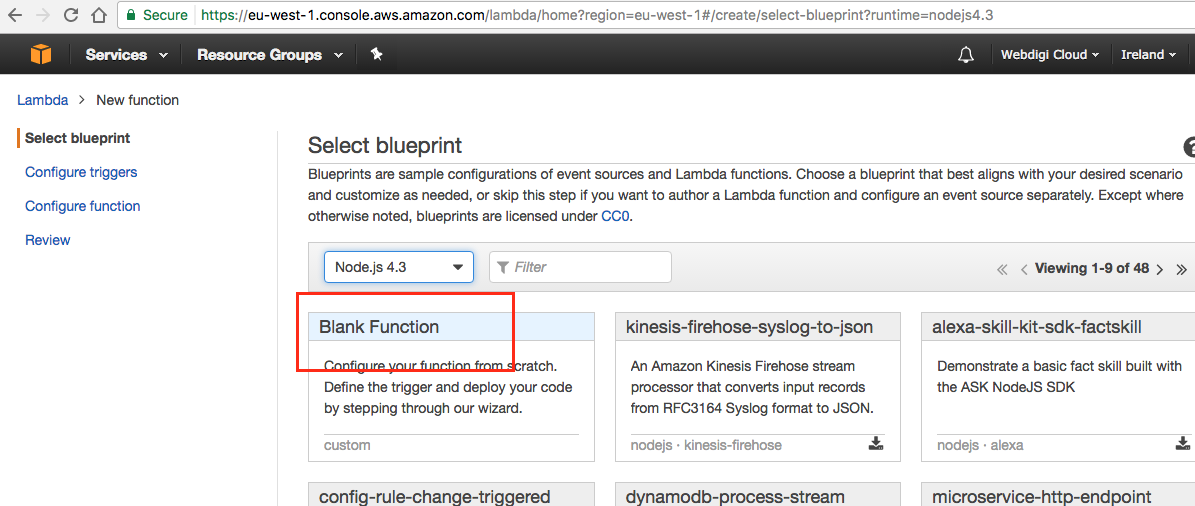
1) Setting up the Lambda script by opening the Lambda console
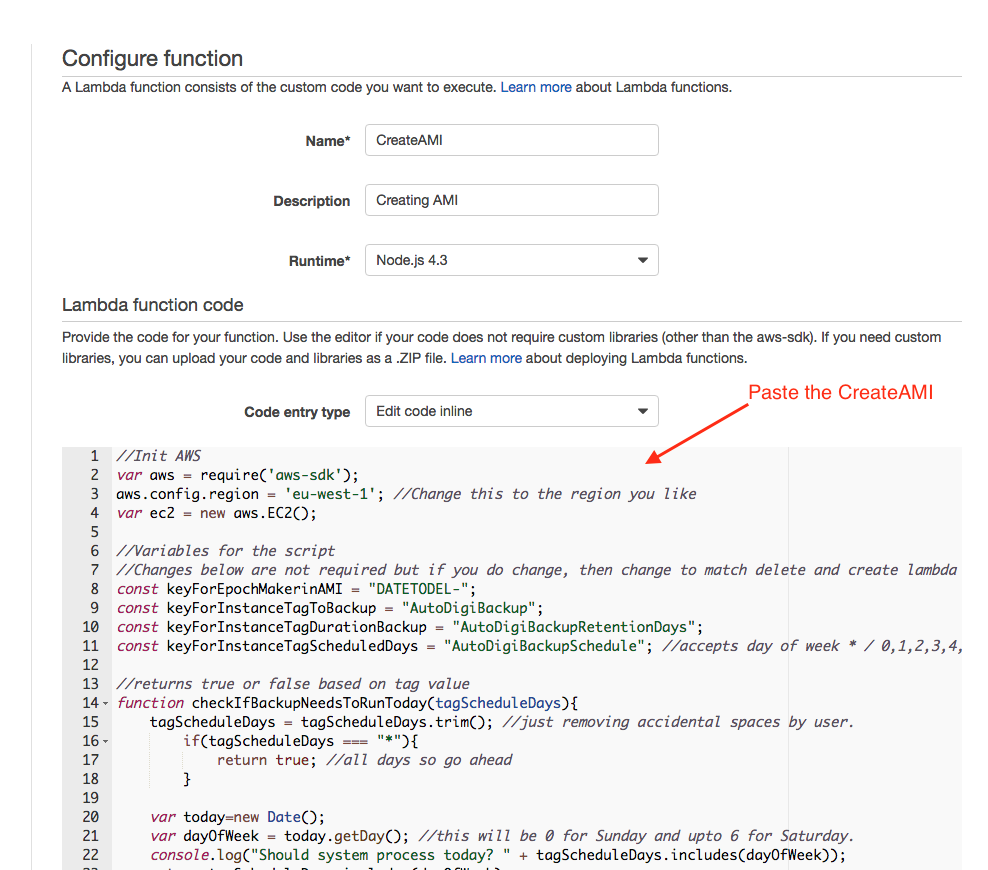
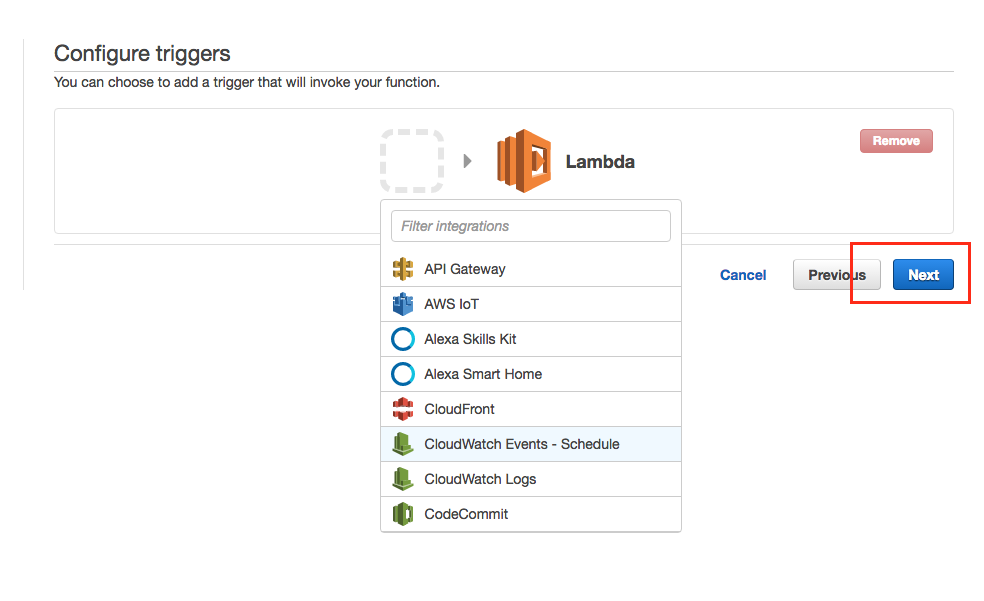
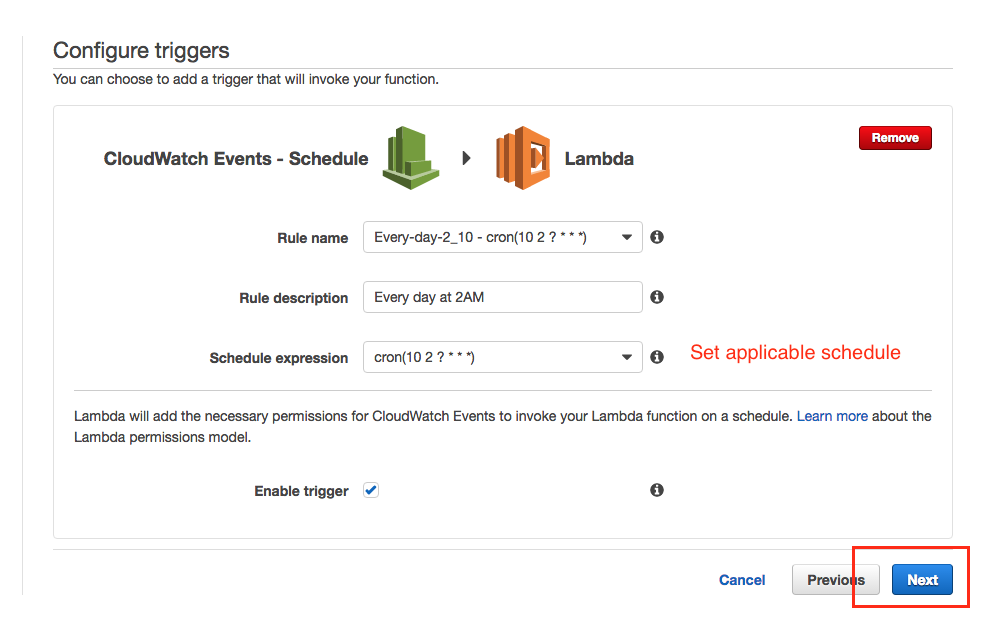
2) Select “CloudWatch Events – Schedule” and click Next 3) Select a schedule you like to setup. Ideally the script has to run every day4) Paste the script for createAMI.js (See github link above)
5) Create a new role and paste the roles/roles.json (See github link above) also increase timeout.
6) Save this and follow step above again now using deleteAMI.js (See github link above).
Setting the tags for EC2 instances (repeat for each instance)
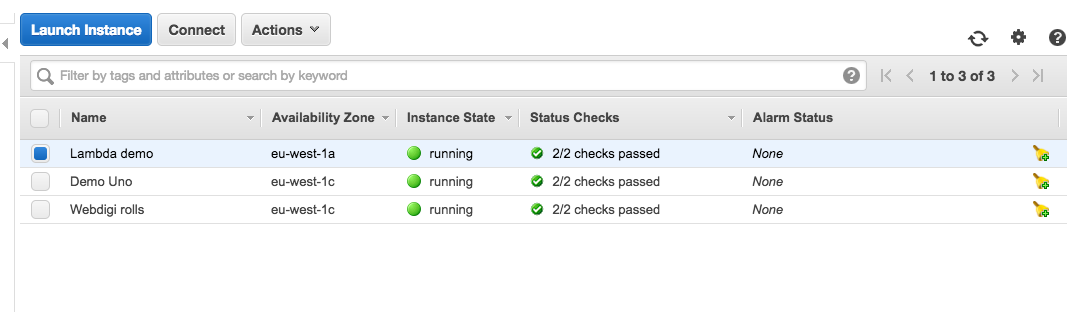
1) Login to your AWS console and open the EC2 section. Then select the instance
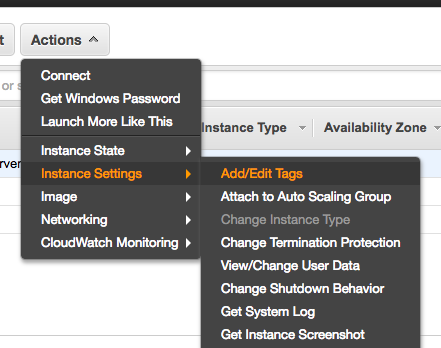
2) Select the add or edit tags as per settings
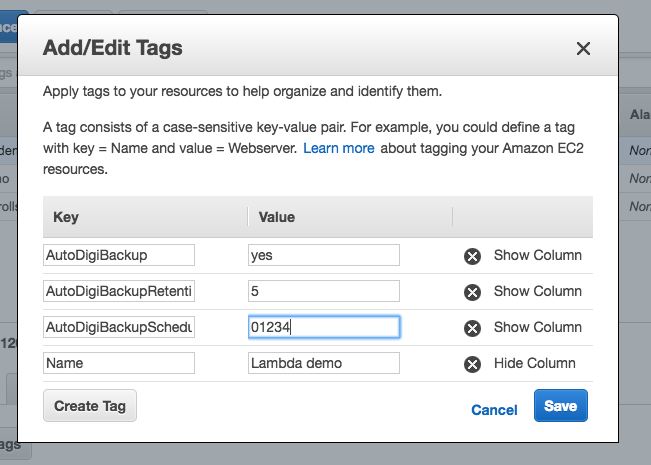
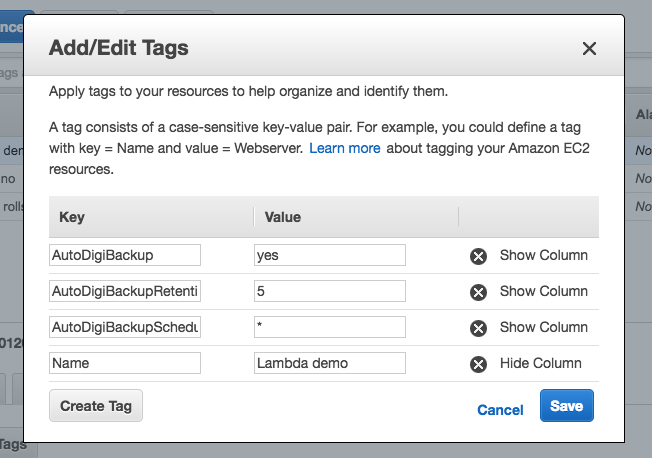
3) Set the three tags with the following Keys & Value a) Key: AutoDigiBackup with Value: yes. This marks the instances that need to be backed up. b) Key: AutoDigiBackupRetentionDays with Value: from 1 to as many days as you want the backup to be stored. c) Key: AutoDigiBackupSchedule with Value: * (for every day) or a mix of number from 0 (Saturday), 1 (Monday) and all the way to 6 (Sunday). You can set value to say 012 which means run on Saturday, Monday and Tuesday. You can set just 6 to run only on Sunday.
Example below is set to create the AMI every day
Save the settings that are approriate for this instance and then save the tags. Please repeat steps 1-3 for all instances that you like to be included.
Here is another quick tip, we had to search around quite a bit to get this to work. I hope this helps someone in the future.
There are quite a few ways to share apps with other people while you are developing the App. TestFlight is popular these days this is a huge improvement to the old method of sending .ipa files with provisioning files, etc.
If another person wants to run the App you are developing on their Xcode Simulator, you will have to hand over the project files (including code) and get the other person to go through a complex build process. All of this can be avoided by using xcrun and sending over the .app file.
Advantage of using xcrun and .app files:
No build process on the person you are sending the app to
You don’t have to handover any code files
Here are the steps to get this to work.
On Xcode (On Xcode 8 for this example), build and run the app on the simulator.
Then open “Activity Monitor” and find the name of the App you are running. Not Xcode, the actual App you are building. If you double click on the App Name, you should get a popup with the tab “Open Files and Ports”. Once you are on the tab you should get a long path for example /Users/webdigi/Library/Developer/CoreSimulator/Devices/A334134-2343-234A-234C-ASD1234EA3/Webdigi.app
The above is the location to the .app file that you need. Copy the .app file from that folder and send it across to the person who wants to run the app on their Simulator.
Now the other person should place the .app file to a location like Desktop
They have to then open Xcode and open a Simulator
On the command line type this command
> xcrun simctl install booted $LOCATION/FILENAME.app
replace $LOCATION with the path and the FILENAME should be the name
The App should appear on the Simulator, just click on the App to Launch it.
UPDATE: 1st May 2018, new L2TP system is used which is more reliable. YAML configuration is used going forward instead of JSON. You can read more about it on our webdigi github page.
NOTICE: 2nd June 2017, we had comments from a few users that some new AWS accounts take a few hours before the account can be activated to use this service.
UPDATE: 15 November 2016, use L2TP over IPSEC instead of PPTP for added security, macOS Sierra support.
UPDATE: 19 September 2016, Added the new AWS Mumbai region also.
So, we all know the benefits of using a VPN like privacy, anonymity, unblocking websites, security, overcoming geographical restrictions and so on. However, it has always been hard to trust a VPN provider who could potentially log and intercept your internet traffic! Launching a private VPN server will give us the best of what a VPN truly offers. This guide will walk you through all the steps to running your own VPN server in about 10 minutes.
Advantages of a Private VPN Server
Simple: Non-techies should also be able to follow this guide easily. Quick: 10 minutes is all it takes to follow this guide and create a private VPN server. Private: Dedicated VPN server for your use only. Secure: Encrypted & password enabled VPN server with no logs. On demand: You can start / stop the VPN server as required. Global: One or more VPN servers in 14 worldwide regions (including London, US, Tokyo, Singapore, Seoul, Canada). Device support: Supports PPTP and L2TP with IPSEC which means you can use the VPN server on your Android, iPhone, iPad, PC, MAC, and even most routers (to support Apple TV, Chromecast). Open source: Review / contribute to this project https://github.com/webdigi/AWS-VPN-Server-Setup Free: New Amazon AWS customers have a free tier server for the first year.
Creating your Private VPN Server
1. Setup a free Amazon (AWS) cloud account.
Visit http://aws.amazon.com/free/ and complete the signup. If you already have an Amazon AWS account then please login and follow on.
2. Select a region for your VPN server.
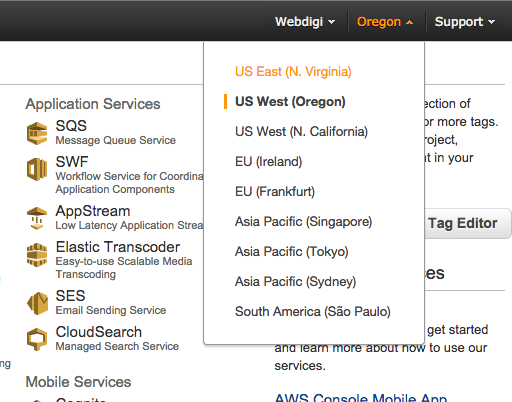
The VPN server can be in the following locations – North Virginia, Oregon, California, Ireland, Frankfurt, Singapore, Tokyo, Sydney, São Paulo. All your traffic will flow through the region that your VPN server is hosted. The selected region will appear in bold next to your name on the top header bar.
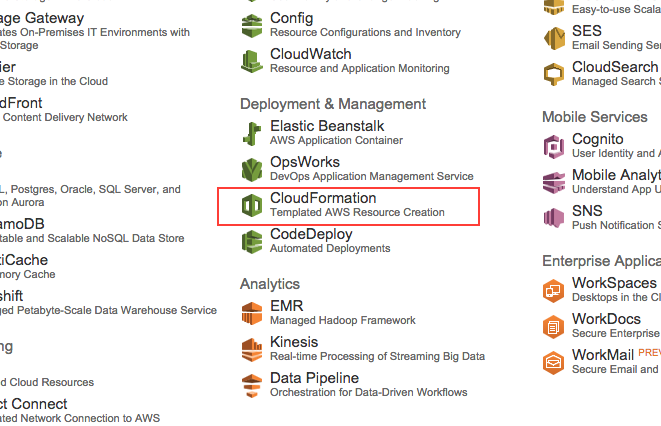
3. Open CloudFormation in the Amazon AWS control panel.
You can follow this link or click on the cloud formation link from the AWS page.
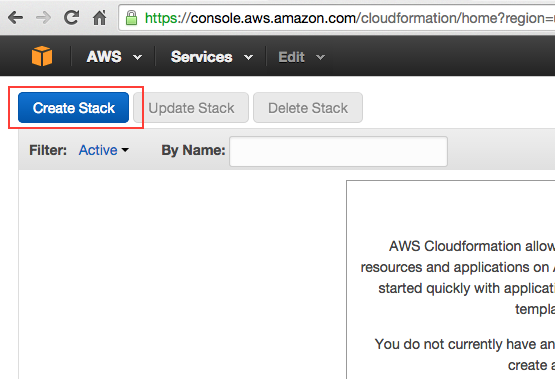
4. Start creating a stack with CloudFormation. Click on “Create Stack” button on top of the page.
5. Setting up the template for the stack
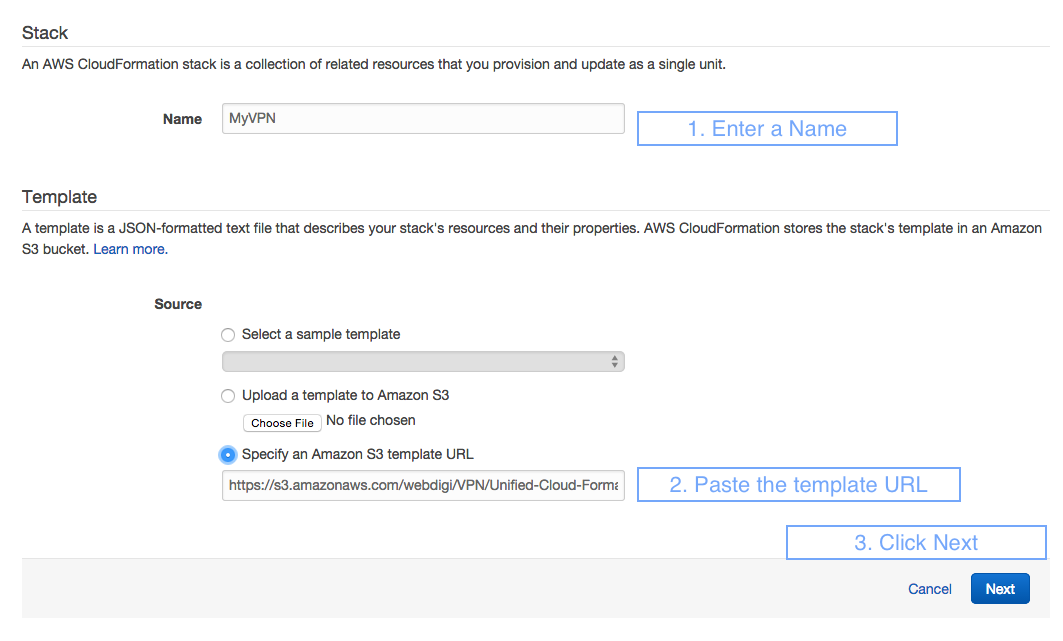
Enter a stack Name say MyVPN (you use what you like). Then under Template, Source, select “Specify an Amazon S3 template URL” and paste in this URL https://s3.amazonaws.com/webdigi/VPN/Unified-Cloud-Formation.yaml and then click Next.
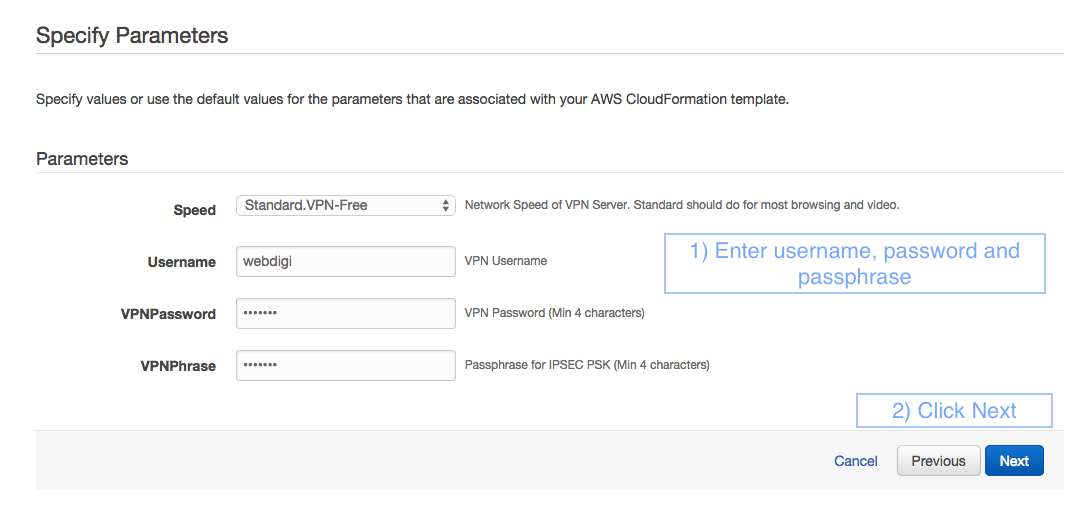
6. Setup VPN access details in the Specify Parameters page
Speed: Select Standard.VPN-Free and this should do for most use cases. We have also added faster server options if you ever require VPN with multiple simultaneous video streams and so on.
Username: VPN username for your VPN server.
VPNPassword: VPN password for your VPN server.
VPNPhrase: VPN passphrase the L2TP – IPSEC connections on your VPN server.
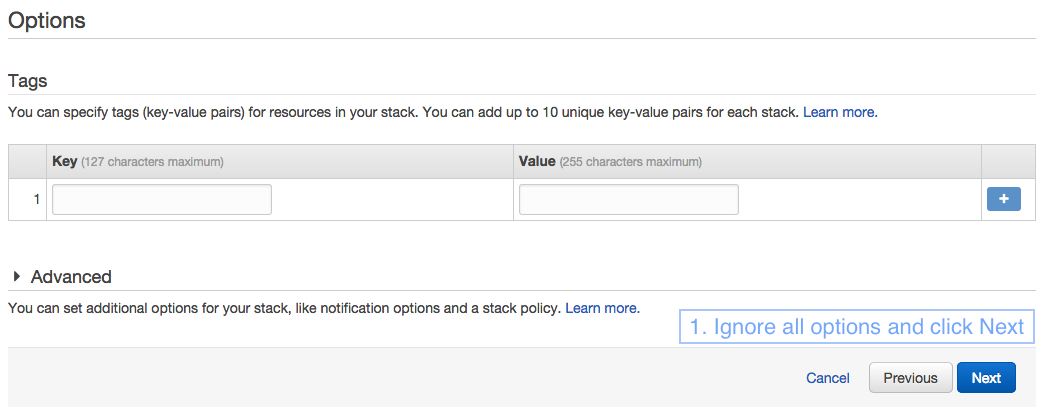
7. You will then be taken to the Options section and you can click Next without having to fill anything on this page.
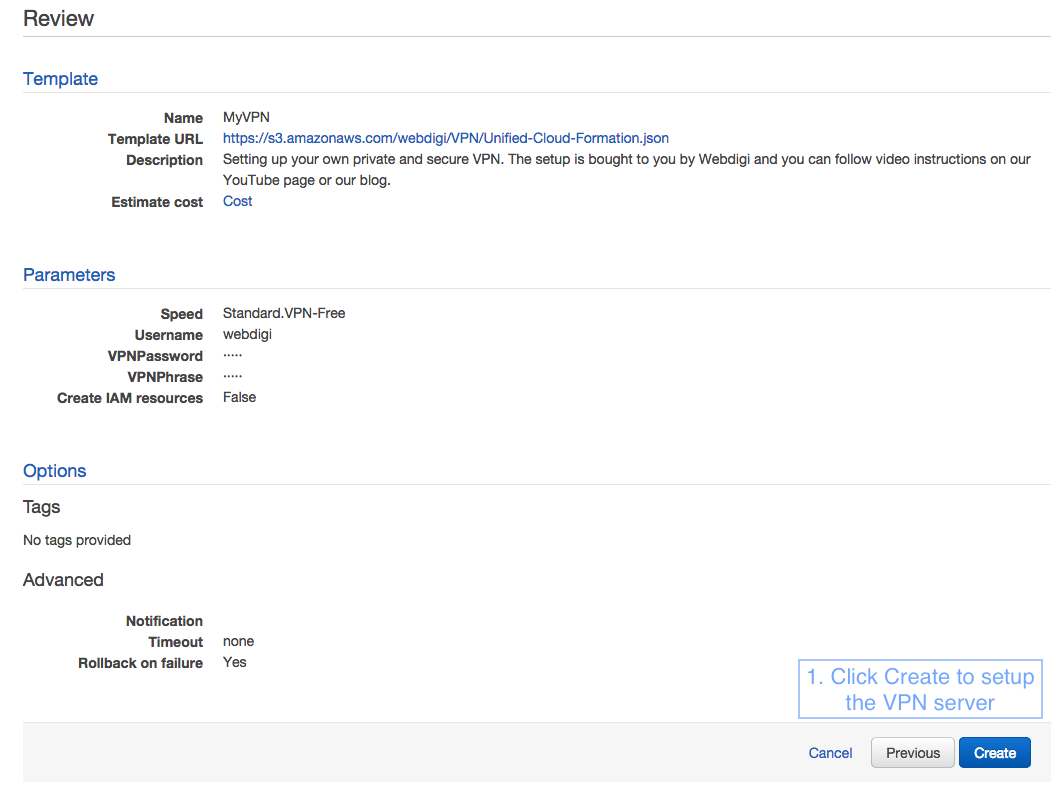
Finally, you will see a review page as in the screenshot below. Just click on Create and the VPN server will be created in a few minutes.
8. Monitoring the VPN server creation
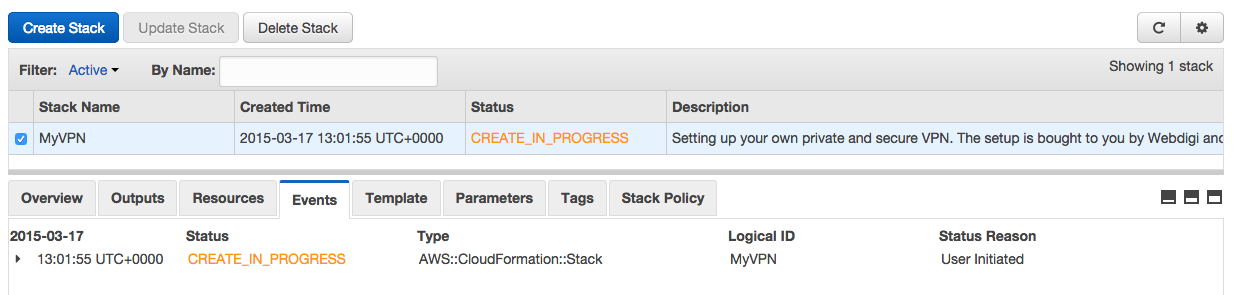
You will see a page which shows that the status is Create in progress as below.
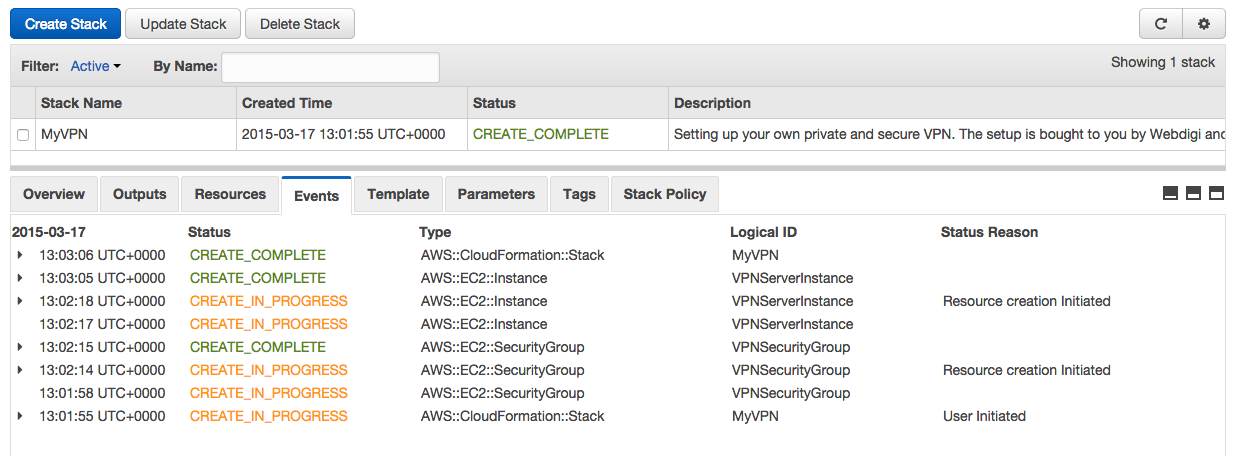
Within about 2 minutes you should see that the stack create in progress is complete as below.
9. Obtain the private VPN server IP address
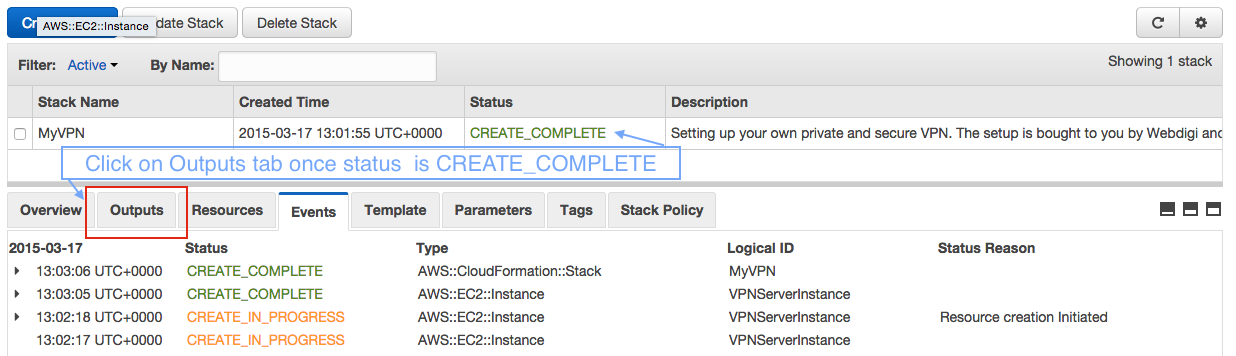
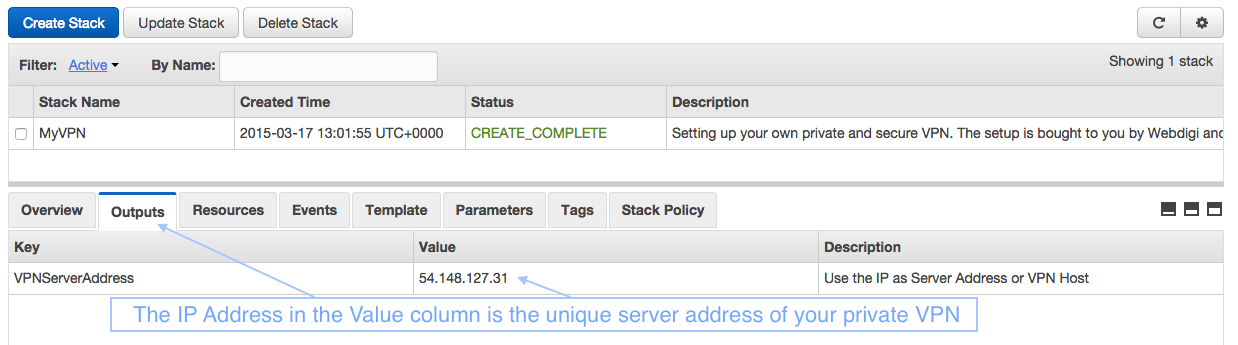
Once the stack status shows as CREATE_COMPLETE you can then click on the Outputs tab.
Now in the outputs tab you can see the server IP address as highlighted below.
Awesome, you should now have your private VPN server running in the IP address shown in the outputs tab. Please note that the IP address is unique for your server and you need it to connect your devices. Now your VPN server is ready and let us connect to it.
Connecting to your private VPN server
Each device has its own configuration to connect to a VPN server. We have added a how to for a few popular devices below. Please note that your private VPN server supports both PPTP and L2TP with IPSEC. This means that your VPN server supports most devices out there including older routers. You can connect to your VPN server with either PPTP or L2TP as supported by your device.
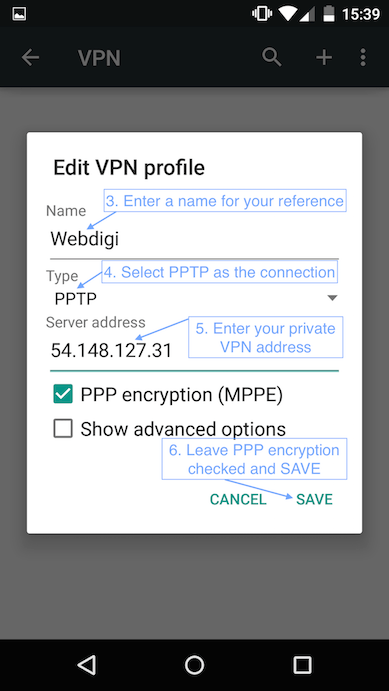
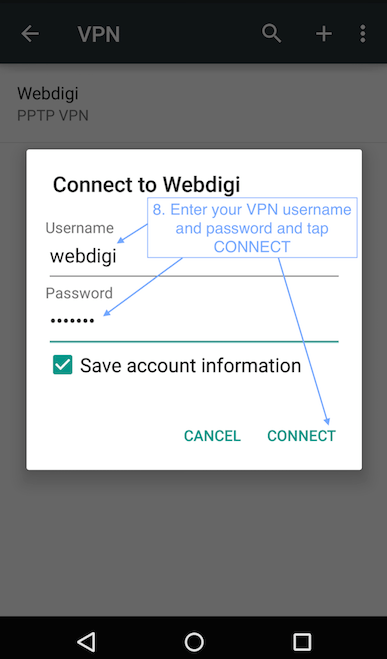
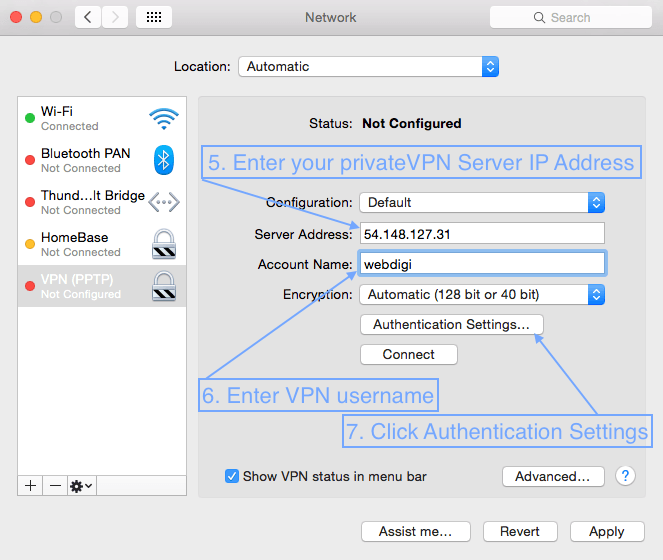
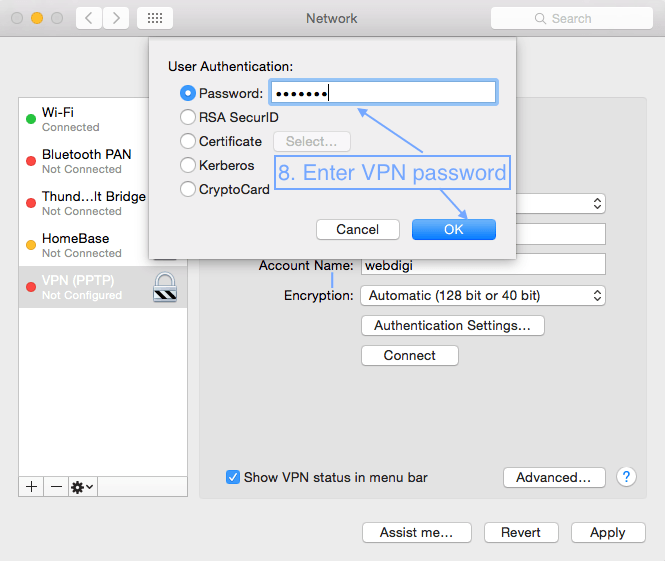
The parameters for your VPN connection are Server Address: The IP address from step 9 and this is unique for your VPN server. VPN Username & Password: From step 6 above. Same username & password for PPTP / L2TP VPN. VPN Passphrase: You set this up on step 6 above and only have to be used with an L2TP connection.
Examples below use PPTP but you can also find out how to setup L2TP with IPSEC on various websites.
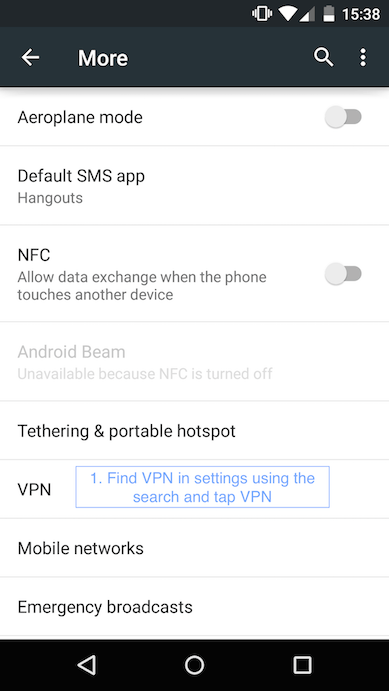
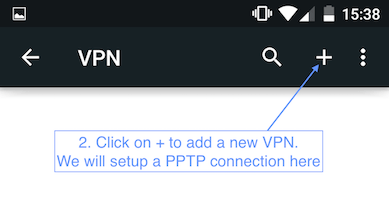
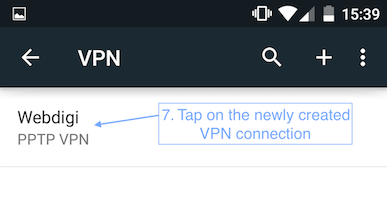
1. Setting up VPN on an Android 5.0
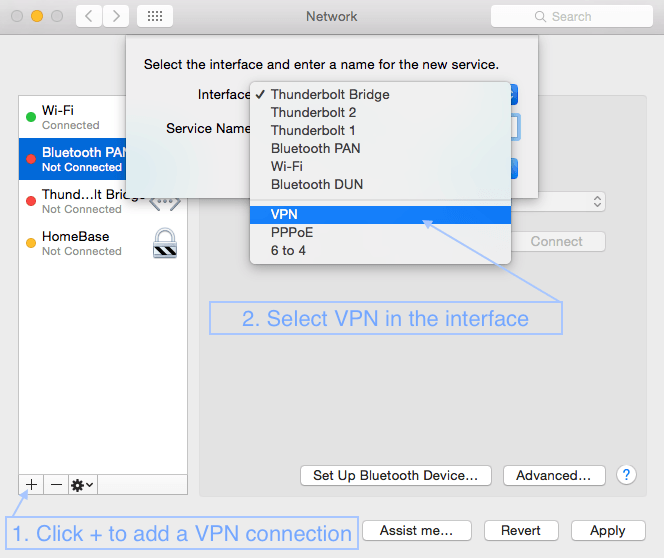
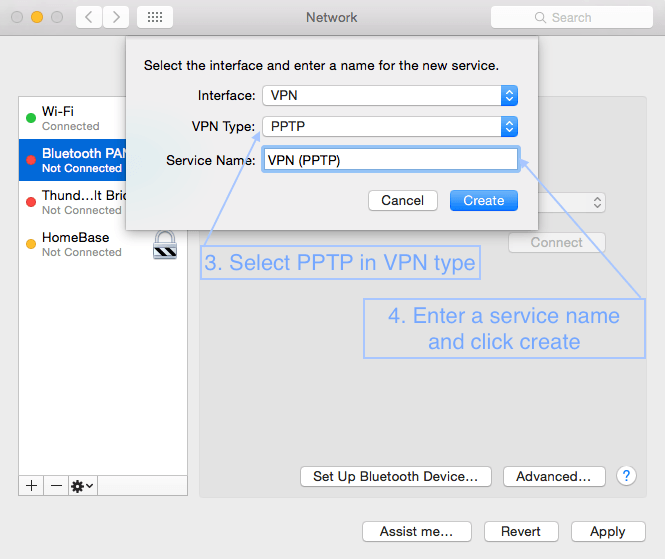
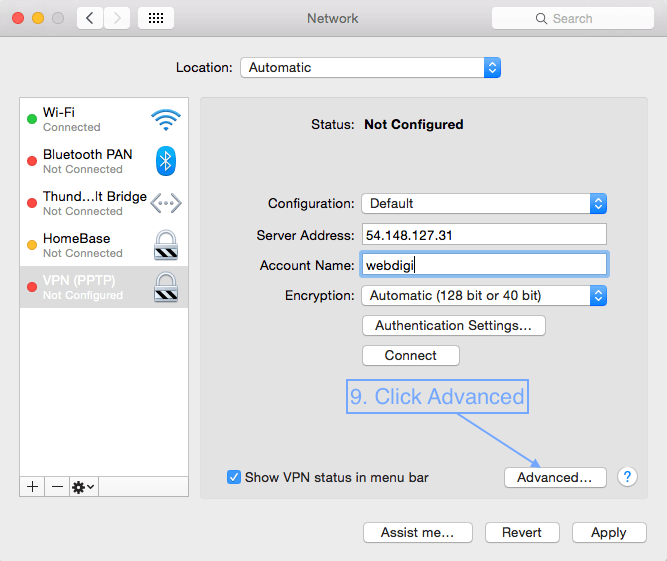
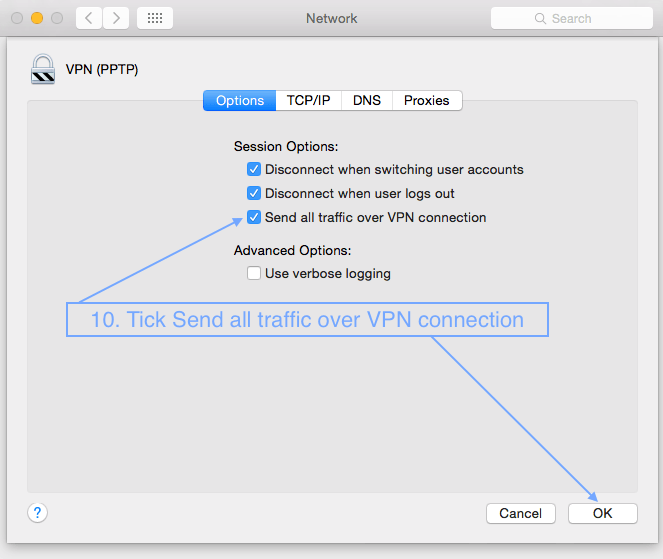
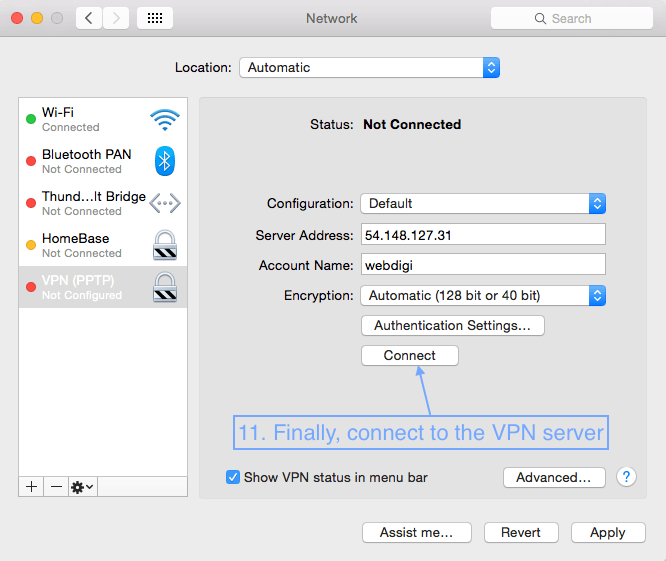
2. Setting up VPN on a MAC with the PPTP connection. UPDATE Nov 2016: PPTP is not supported on macOS Sierra so follow point 3 using L2TP over IPSEC (below).
First open System Preferences, then Network and follow the screenshots below.
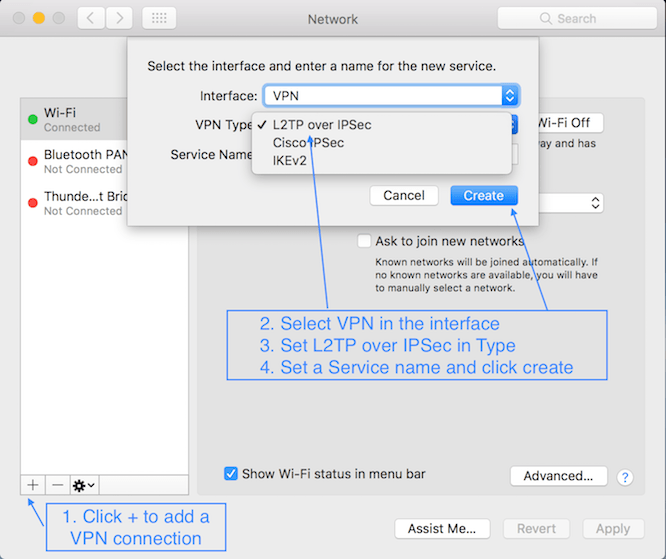
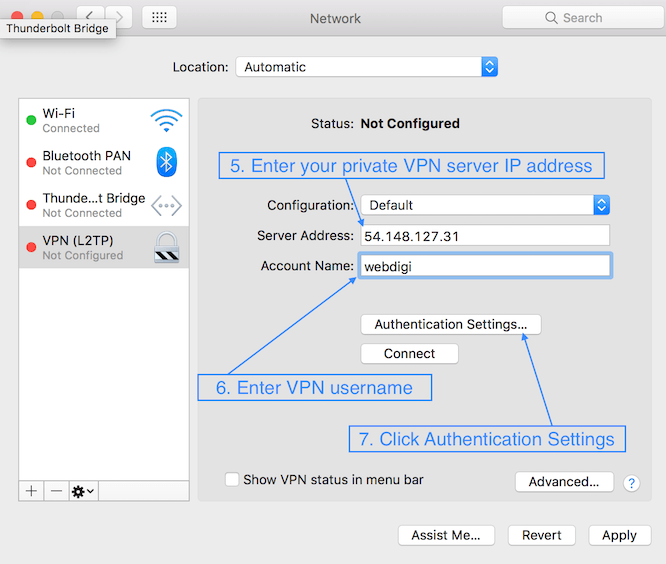
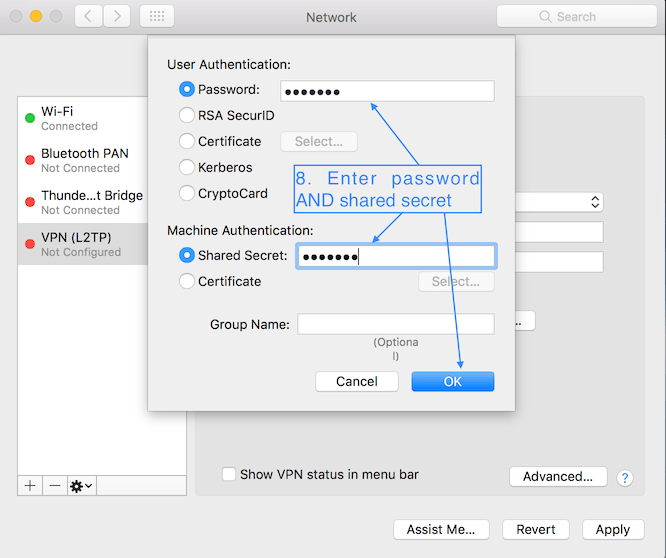
3. Setting up VPN on a Mac with L2TP over IPSec UPDATE Nov 2016: L2TP is recommended now. Follow instructions as in PPTP after you setup up to point 8 below.
Follow other steps as outlined in the above section on PPTP to finish the setup.
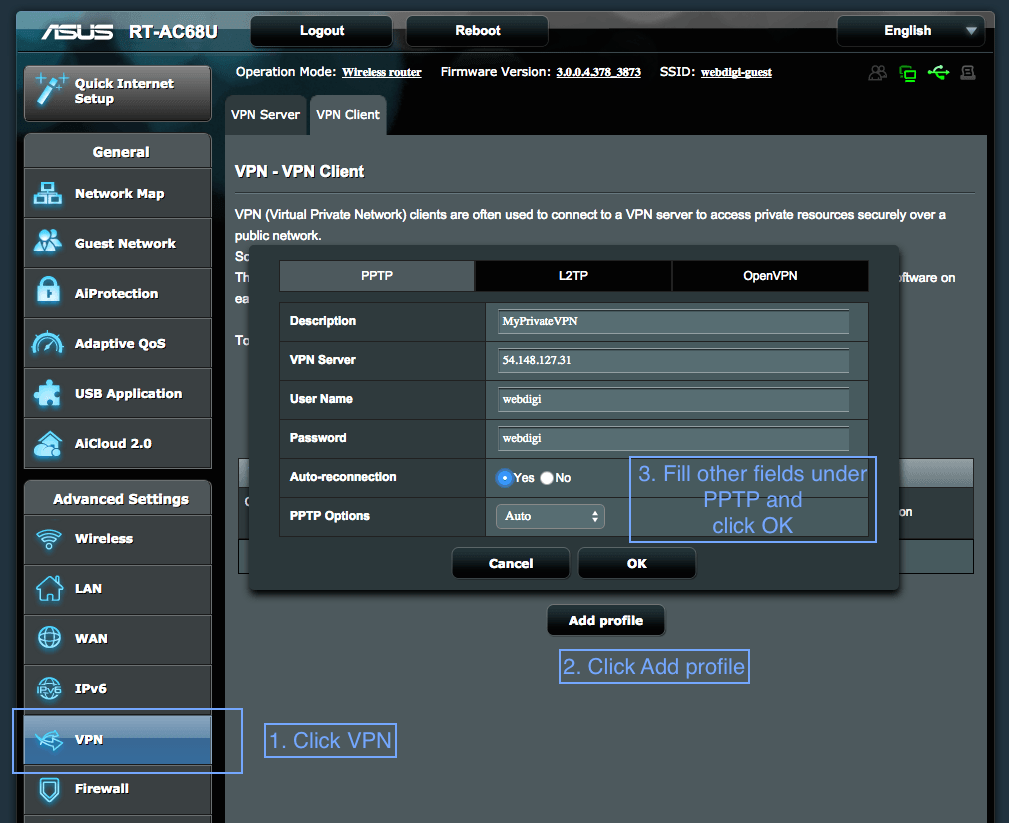
4. Setting up VPN on Asus RT-AC68U router
5. For all other devices please search for Setting up PPTP VPN on my iphone and so on. You can also setup an L2TP IPSEC VPN which is more secure but might not be supported on all devices.
Tips / Suggestions
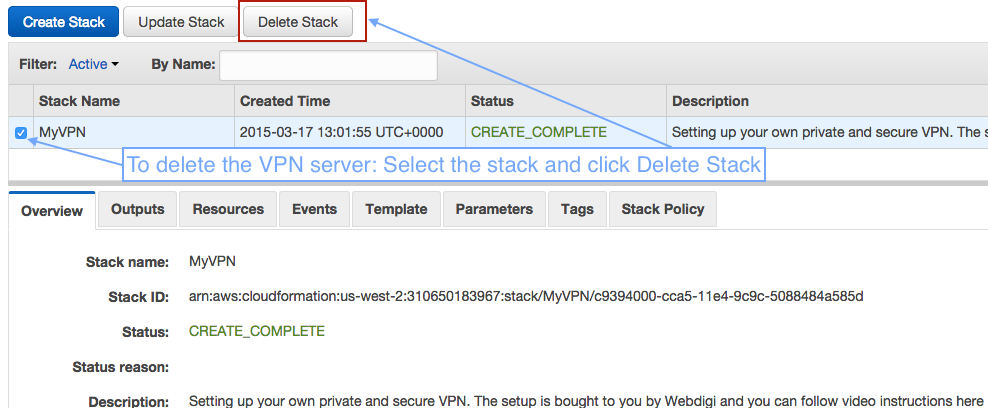
1. If you want to delete your VPN server then just open CloudFormation on AWS. Make sure you select the same region that you created your VPN server. Then just click on Delete Stack button and your private VPN server will be removed.
2. You can have multiple VPN servers all over the world. You just have to repeat the setup steps in this guide by selecting different regions. Please note that AWS free tier gives you a total of 750 hours a month free. You can also delete and create VPN servers as frequently as you want.
3. Setting up a VPN connection on your router will allow all devices on its network to use the VPN server. This could be beneficial for use with AppleTV / Chromecast and any device that does not support a VPN.
4. You can test if your VPN connection is active by just searching for “what is my ip address” on your favourite search engine. The IP address reported will be that of your private VPN server if everything is your connection is enabled. If your VPN connection is not enabled or if the VPN server settings are not complete then it will report your ISP’s IP address.
OpenSSL which is used by several million websites was found vulnerable to the heartbleed vulnerability. Thankfully it is quick and easy to fix following these instructions.
Why do I need to fix it?
When it is exploited it leads to the leak of memory contents from the server to the client. This means anything in the server memory (RAM) could be potentially sent to a person exploiting the bug. Here are examples of what is on your server memory:
1) The encryption keys themselves
2) User names and passwords used on the web
3) PHP Session IDs
4) Data being sent to other users
How can I test the vulnerability?
We used a python script to test the vulnerability on our servers. A single python file which sends the target server a carefully crafted heartbeat message and waits for the server to send back a lot of sensitive information. Alternatively you can use the SSL test tool on the ssllabs website.
– Are there any other software statically linked to OpenSSL? Nginx? Ruby? PHP? You need to recompile or restart them
– Replace any API tokens or passwords in use
– You might have to create a new private key and CSR to get a new SSL certificate
– Do you feel like your users might have been compromised? You will then need to ask them to change passwords
Parse is an app development platform for the cloud that held its first developer’s conference on September 2013 in San Francisco, California. Parse had recently been bought by Facebook, and so far promises to be a major contender in the app development arena.
If you wanted to attend the conference but missed it, you can still get the key points and see some of the presentations. 23 people presented, most of them from Parse with one from Stripe and two from Microsoft.
5 New Parse Products Unveiled At Developer Day
The Parse/Facebook partnership was ready to show off 5 new Parse products designed to assist cloud app developers.
Parse Analytics: this category includes Push Analytics and the recently-released Custom Analytics. The former provides insight into user activities and app interactions, as well as passing API requests. The new Custom Analytics capability lets you set your own arbitrary events and dimensions to track any metrics you deem worthy.
The Unity Software Development Kit (SDK) Unity: is a powerful tool for game developers, helping them build intricate cross-platform games. This SDK lets developers use Parse for file and object storage, user management, rich querying, Facebook authentication, role-based access controls, and for accessing analytics data.
A New User Module: The Parse User Session Module gives developers a great solution for keeping Parse users logged in from page to page. It makes use of the traditional Parse.user methods, giving an unprecedented ability to manage user log in-and-out.
A New Image Module: The Parse Image Cloud Module is for easy manipulation of graphical images. This module includes a host of useful features like automatic generation of images to save bandwidth. For complete instructions on how to use this module, see the official Parse guide.
Background Jobs: This new feature is perfect for creating, automating, and managing long-running and recurring tasks. Once you create a job, you can set its start date, the parameters it takes, and how often to repeat it.
These features are designed to let startups focus on what their founders started them up to do, without worrying about managing their data and wasting time on tedious tasks. In regards to Facebook, these new Parse tools make Facebook an even more desirable destination for app developers looking to integrate a social network into their apps. Overall, it turns Facebook into a more comprehensive suite of tools and resources.
If You Still Want To Feel What It Was Like
If you just aren’t content with getting the bare-bones summary of the conference, you can watch the 15 recorded sessions of keynote, introductory, and advanced talks given by the speakers. These videos will be posted on the Parse blog periodically over the next few months.
The first two videos are already up on the Parse blog. You can now watch the keynote address, given by Ilya Sukhar, CEO of Parse, as well as the exciting Developer Show and Tell.
There are hundreds of domain name registrars you can choose to register your website domain name with. EG: Gandi, Namecheap, Godaddy to name a few popular ones. However, we recently had a couple of clients who use markmonitor as their domain name registrar. Looking around on markmonitor website and searching through the whois records revealed something rather surprising.
All of Google, Gmail, Youtube, Blogger, Yahoo, Flickr, Microsoft, MSN, Bing, Baidu, Ebay and even Facebook use markmonitor as their domain registrar. Further whois queries shows that 9 out of the top 10 websites by traffic use markmonitor as their domain registrar. This was also the same case with websites of HSBC, Bank of America, UBS and pharmaceuticals like Pfizer, Novartis, Merck and so on. The list of popular domains registered by markmonitor goes on and on.
To be clear, markmonitor do not have traffic flowing through them as all companies listed above run their own authoritative DNS servers.
EG with Whois of Google.com the name servers are ns3.google.com, ns2.google.com, ns1.google.com, ns4.google.com and all these servers are controlled by Google.
In theory markmonitor could change nameserver records to another server and take over any of these websites. Potentially a rogue markmonitor employee or hackers could also change the nameserver records of these top websites on the internet. However, I would assume that most of these nameserver queries are cached by different ISPs for a long time and someone could jump in and fix the issue before it affects a lot of users.
In summary, it is surprising that Facebook, Google, Microsoft, Yahoo, Ebay all use the same registrar. These sites and many more under markmonitor account for significant traffic on the internet. Potentially creating a single kill switch for bulk of the internets. Does anyone know of a suitable alternative to markmonitor? Is there a solid safeguard against external parties changing these nameserver records?
Accelerometer support is available in Mobile Safari and all new android devices. This enables the browser to sense movement, speed and direction with Javascript on mobile & tablet devices. If we push the movement data from the mobile device instantly through a nodejs server to a browser, then we can control a game on the browser. This is exactly what we have put together in this fun little html5 demo.
Try the game before you go through the components that make up this demo.
Android / iOS controller
The user scans the QR code or visits the unique link created for them from the demo landing page to start the controller. The controller code reads accelerometer values and then passes the movement to the nodejs server.
Key parts of the iOS device controller code
//Detect if the browser supports DeviceMotionEvent
if (window.DeviceMotionEvent != undefined) {
//ondevicemotion is fired when iOS device detects motion
  window.ondevicemotion = function(e) {
//ax is the movement on the x axis.
//This motion is used to move the ship in the game
  ax = event.accelerationIncludingGravity.x * 5;
  ay = event.accelerationIncludingGravity.y * 5;

//Status 0 is start, 1 is left, 2 is right, 3 is stay
if(status == 0){ //initial condition
  status = 3; //stay
  socket.emit('spaceChange', {'ax': 3});
  statusmsg = 'Waiting for movement';
}
if(ax > 14 && status != 2){ //move right on device
  status = 2;
  socket.emit('spaceChange', {'ax': 2});
  statusmsg = 'Moving ship right';
}
if(ax < -14 && status != 1){ //move left on device      status = 1;      socket.emit('spaceChange', {'ax': 1});			         statusmsg = 'Moving ship left';  }  if(ax > -14 && ax < 14 && status != 3){ //device held steady
  status = 3;
  socket.emit('spaceChange', {'ax': 3});
  statusmsg = 'Ship held steady';
}
The controller code detects movement from accelerometer and only pushes data to the nodejs server if there is a change in direction of the device. This reduces the data pushed from the phone to the server when compared to sending all the live accelerometer values to server. Finally, the value 14 in ax is set as a threshold to detect if the user is moving the device to the left or right.
Node.js server with SocketIO (Server side)
Node.js is a server-side JavaScript environment based on Google’s V8 Javascript engine. Programs are written in JavaScript, using event-driven, asynchronous I/O to minimize overhead and maximize scalability. Socket.IO sits on top of Node.js and makes it easy to deliver realtime data between almost every browser and the node server. Socket.IO code runs on the server and the client side. This makes Node.js and Socket.IO ideal candidates to be able push accelerometer values instantly from mobile safari to the desktop browser.
Each visitor to the game landing page is assigned an unique random id that links the browser and the iOS safari instance. User loads the URL provided on their iOS device and then safari detects accelerometer motion, which is then pushed by socket.io on client side to the node server. The randomly generated id is used as a room for the user so that push from user device is only sent to a particular browser.
Server side Socket.IO code
//Start on connection
io.sockets.on('connection', function (socket) {

 //Set room for user when connection is made
 socket.on('setChannel', function (data) {
 socket.join(data.channelName);
 });

 //When iOS device moves send data to browser
 //Multiple browsers can be listening to same device
 socket.on('spaceChange', function (data) {
 socket.broadcast.to(data.channelName)
                   .emit("spaceChanges",data);
 });

});
Browser game and client side Socket.IO
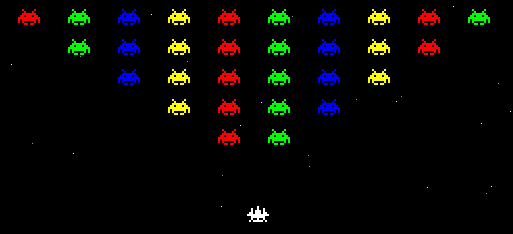
The browser game can be played with the keyboard arrows or with iOS device movement. The space invaders game itself behaves like a standard HTML5 game which uses HTML canvas. Thanks to Erop Balyshev for developing the well tested game in a couple of days. The html game code is commented and you should be able to understand the underlying code for the game quite easily. The socket communication and movement based on feedback from the iOS device was later plugged into the game code.
Code below shows how data from server is handled on the browser.
//iOS detection and corresponding action
var lastkey = 37;
var dataStart=0;
  socket.on('connect', function() {
   //if sockets gets disconnected then mention room again
   socket.emit('setChannel',
              {'channelName': '<!--?php echo $randRoom; ?-->'});
  });

  socket.on('spaceChanges', function (data) {
     if(dataStart == 0){
        //First movement data arrived
        document.getElementById('status').innerHTML
                  = 'Receiving data from your iOS device';
        dataStart = 1;
     }
    ax = data.ax;
    var	posob=new Object();
    if(ax == 2){
        //move right
        lastkey = 39;
    	posob.keyCode = lastkey;
        posob.type = 'keydown';
        document.getElementById('status').innerHTML
                   = 'iOS device tilted right';
    }
    if(ax == 1){
        //move left
        lastkey = 37;
    	posob.keyCode = lastkey;
        posob.type = 'keydown';
        document.getElementById('status').innerHTML
                   = 'iOS device tilted left';
    }
    if(ax == 3){
        //hold ship in place
    	posob.keyCode = lastkey;
	posob.type = 'keyup';
        document.getElementById('status').innerHTML
                   = 'iOS device held steady';
    }
    //Send action received above
    keypressaction(posob);
  });

//Fire automatically once first data starts
window.setInterval(function(){
  if(dataStart == 1){
    var posob=new Object();
    posob.keyCode = 32;
    posob.type = 'keydown';
    keypressaction(posob);
    posob.keyCode = 32;
    posob.type = 'keyup';
    keypressaction(posob);
  }
//Timer is correctly a shot ever 200ms.
//Decrease 200 to lower for even faster firing!
}, 200);
Conclusions
– We are very impressed with the instant movement detection and control over the game.
– You can also run multiple browsers on your desktop with the same id get parameter and have it all controlled with the same iOS controller.
– Current space invaders game uses only X axis movement on the iOS device. However, all three dimension values are available on iOS safari ondevicemotion method. It is technically possible to do much more with the iOS device. Probably the ship can fire when user shakes the device?
PHP 5.4 was released yesterday. It took nearly 2 years since the release of version 5.3 and has been a huge undertaking. Congratulations to the guys that made it happen. Let’s take a look at the features:
1) Speed PHP 5.4 is the fastest of all PHP versions. Benchmarks both Synthetic and real-life show a pretty impressive jump in performance. Drupal, WordPress, etc are faster by almost 10% while Zend Framework was faster by 21%. There is a lot of improvement on memory usage, performance (req/sec), etc. Andy Gutmans of Zend claimed the memory foot print is also lowered by upto 35 percent (that is huge!). Read more about the tests here
2) Short echo tags Short echo tags will always work irrespective of the ini settings.
<?= "Always works even if ini short tags are disabled" ?>
3) Compact Array Syntax and Array Dereferencing
Both of these changes makes the code look much more cleaner and easier to read. Take a look at the examples below
$a = [1, 2, 3]; //Same as array(1, 2, 3);

//Dereferencing
$a = "Zero One Two Three Four";
echo explode(" ", $a)[4]; // outputs Four

//Function Array Dereferencing
function movies() {
return ['Mission Impossible', 'Transformers', 'Titanic'];
}
echo movies()[1]; //Outputs: Transformers
4) How long did your script take to execute? Previously you set a start variable and store time in it. Then you write your code and compute the difference in the end. Like this
$time_start = microtime(true);
// Run a lot of your code
$time_end = microtime(true);
echo "Took:", $time_end - $time_start; //Time spent

// Just one line at the end of your script with PHP5.4
echo "Took:", (microtime(true) - $_SERVER['REQUEST_TIME_FLOAT']);
5) Built in Web Server (CLI)
Well, we’ve been strongly recommended not to use this on production as this is brand new and not intended to replace Apache/nginx !
$ php -S localhost:8080
The above shell command gets the web server running at port 8080 after setting the Document Root as the current working directory. It also serves static assets and supports URL routing.
6) Traits
Traits is “compiler assisted copy-paste” literally, it is also known as “Horizontal Reuse” and similar to functionality of “Multiple Inheritance”. This implementation adds 4 new keywords: trait, use, as and insteadof. As and insteadof are used to resolve conflicts when you use multiple traits.
trait sayHello { //First Trait
public function hello() { echo "Hello"; }
}
trait sayWorld { //Second Trait
public function world() { echo "World"; }
}

//Then we define the class
class sayHelloWorld {
use sayHello, sayWorld; //use brings in both Hello and World functions
}

$say = new sayHelloWorld();
$say->hello(); //Hello
$say->world(); //World
Conclusion
No concrete plans for PHP 6 or other versions announced yet, However, there are lots of cool stuff here to get excited about. With PHP 5.4, the new Default Page Charset is now utf-8. There are other features like a callable type hint, support for $this in anonymous functions.With closures, cleaner array syntax, PHP is now looking more like Javascript.
There are two major changes announced for Facebook pages. The most prominent is the change to the the layout and fan page design (forced update due on March 10th 2011). The second is that Facebook pages now support iframes. This means that developers are free to use popular, simple and standards-based web programming model (HTML, JavaScript, and CSS) compared to highly restricted FBJS and FBML. There are lots of reasons to be excited about this. Here are a few of our best:
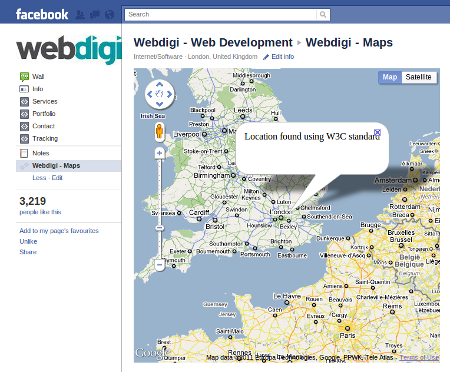
1) Google maps on pages
You can now have fully functional Javascript based maps within Facebook pages. This makes it easier to display business location, location of stores, hotels, etc. To make things even more flexible, mapping services will now have access to your location if you use newer browsers.
To see this functionality in action, go to the maps page. You need to be logged in to Facebook to view the page. Please note that your location is not stored by us and used just to display a map for the demo purposes.
2) Add youtube videos and other music players
The iframe technique also make it much easier to embed youtube videos and other flash/HTML5 multimedia. This gives users access to related videos and more added functionality. This also includes the ability to view the video in full screen. Click on the image above to go to the video demo page.
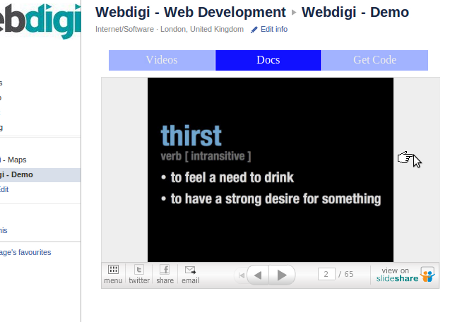
3) Embed slides and PDFs
Embed external docs to your fan page
Like how a video is embedded, you can now embed slides, PDF, other documents using Slideshare or related apps. Here is a direct link to the docs demo page.
4) Create amazing landing pages
Use any Javascript library of your choice: jQuery, ExtJS, mootools, etc. You can even use flash or HTML5 to create great landing pages. In short, the only limitation on design, layout and functionality is now your imagination and the restricted width of around 520px.
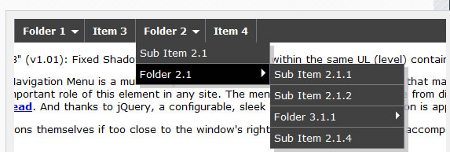
5) Create your own top navigation menu
Create your own top level menu
The previous Facebook page design had top level navigation tabs which have now moved to the left side of the page. This does free up some space and lets the developer create their own top level navigation tab. Including multi level level navigation.
6) Add a like button within the page
No longer need a click above to Like
There are thousands of Facebook pages including top brands like Coca cola which have the text like “Click on like button above”. This will no longer be required. You can now have the like button within the page. An example is what we have on our page here.
7) Special content for Facebook page fans
You can have a special page displayed for Facebook fans. This is possible because Facebook sends a signed request to your server each time your page loads. This request from Facebook has details like user language preferences, age restrictions and also information showing if an user is a page fan, page admin, etc. All the source code for all the above pages is available on this page.
Notes:
– Our page has been updated to the new version. This is a requisite for working on the new iframe enabled facebook pages.
– All the code is free to use as usual and is intended to demo the features of iframes on Facebook tabs.
– You seem to need to be logged in to Facebook to be able to view the demo pages in action!
– For those beginners who are not sure how to create the iframe tabs, please visit the Facebook guide on creating pages
What features or possibilities excite you the most?

 3) Select a schedule you like to setup. Ideally the script has to run every day
 4) Paste the script for createAMI.js (See github link above)